Inventory Short Handling
This document explains the inventory short & cut handling methods and processes in Ceres 5. Typically, a short or a cut represents the difference in quantity between what an Agency orders and what the food bank can physically fulfill.
Ceres Object release 5.00.00 is required for the functionality described in this document.
Overview
The Inventory Short & Cut Handling functionality provides different methods for handling inventory shortages that a food bank can select on a location by location basis. Shortages are when the quantity shipped is less than the original order quantity on an Agency Order, Inventory Pick, or Warehouse Shipment. This allows for different short handling processes at each location.
Since food banks do not typically allow for backorders of products in an inventory short situation, the Inventory Short Handling functionality also automatically clears the backorder by updating and deleting the warehouse documents during posting.
An example of the use of this capability would be:
-
An Agency orders 10 cases of an item
-
Available Quantity in Ceres is more than 10, but likely not much more.
-
The Order selector goes out to Pick the order and cannot find the 10 cases that were ordered.
a. If the selector can find some, but not all, that is called a Short.
b. If the selector cannot find any of the item, that is generally called a Cut.
-
The difference between the quantity ordered vs. the quantity that can be found will flow to a designated Item Journal for the appropriate team to cycle count. While on the Journal, the cases won’t be available for anyone else to order.
This functionality is especially important if you use Agency Express, and agencies order near real-time based on available quantity.
The Inventory Short & Cut management described above is available to use in conjunction with Ship Option 1, 2, or 3 with Ceres. Each is described in more detail below.
Inventory Short Handling Methods and Setup
-
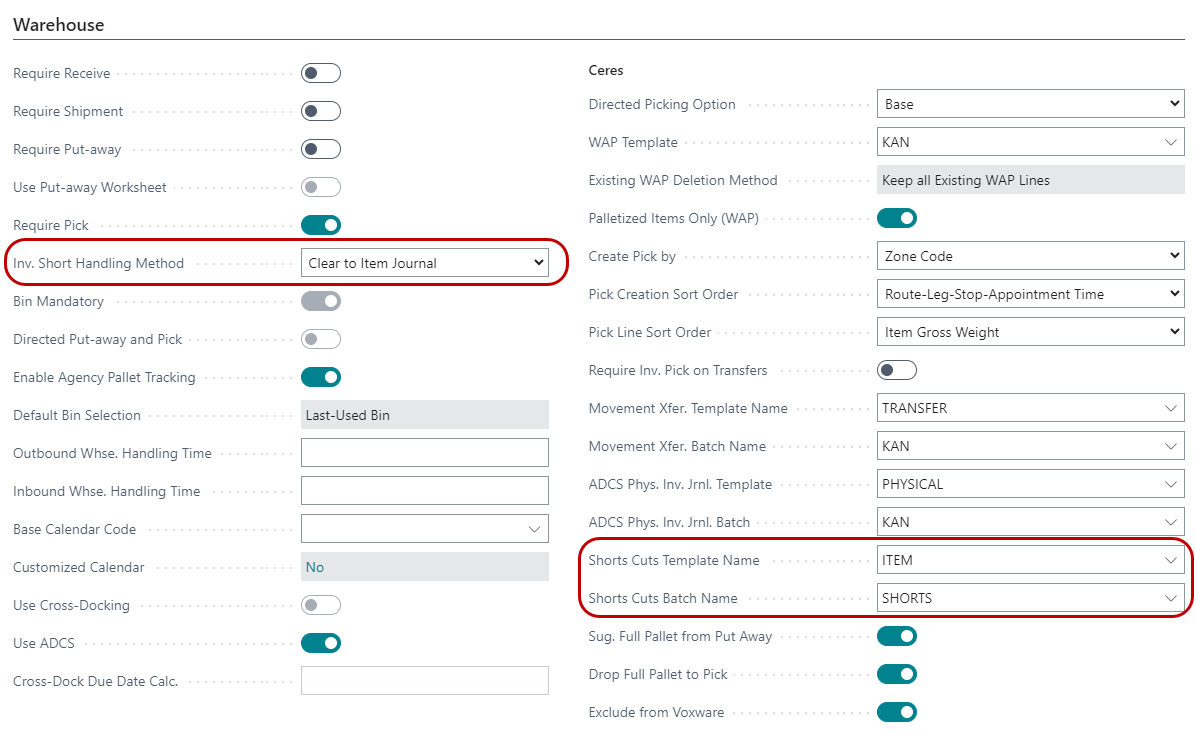
The inventory short handling methods are defined on the Warehouse FastTab of each Location Card. The fields that support this functionality are Inv. Short Handling Method, Short Cuts Template Name, and Short Cuts Batch Name.
-
In the Inv. Short Handling Method field, select how to handle inventory shorts when posting Agency Orders, pick documents, and shipment documents. This functionality also automatically clears any backorders (retained order demand) that were a result of the inventory shorts. The methods are:
None – When the quantity shipped is less (short) than the original order quantity; no updates are made to the order quantity during posting. This method applies to the Agency Order with Shipping Option 1, the Agency Order and/or Inventory Pick with Shipping Option 2, and to the Agency Order and Warehouse Shipment with Shipping Option 3. No backorder is created since the documents will still be there with a pending Qty to Ship that will need to be cleared manually for some Ship Options. Once the Qty to Ship is deleted, then the available inventory will increase for the item for the shorted amount.
Clear to Avail. Inventory – When the quantity shipped is less (short) than the original order quantity; the order quantity is set to the quantity handled/shipping during posting to reflect what was actually shipped. This method applies to the Agency Order with Shipping Option 1, to the Agency Order and/or Inventory Pick with Ship Option 2, and to the Agency Order and Warehouse Shipment with Shipping Option 3. In this instance, the fact the order was shorted is not tracked. The inventory that was shorted will flow back to Available Quantity for the Item.
Clear to Item Journal – This option means you are actually using Inventory Shorts as described above. When the quantity shipped is less (short) than the original order quantity, the order quantity is set to the quantity handled/shipped during posting to reflect what was actually shipped. Plus, a negative adjustment is automatically created in the Item Journal Shorts Cuts Batch for the short amount. Since the negative adjustments are not posted automatically, the entries will need to be reviewed and posted manually in coordination with a cycle count. This method applies to the Agency Order with Shipping Option 1, to the Agency Order and Inventory Pick with Shipping Option 2, and to the Agency Order and/or Warehouse Shipment with Shipping Option 3.
-
In the Short Cuts Template Name field, indicate the Item Journal Template that will be utilized for inventory shorts/cuts. A Template must be set up when Clear to Item Journal is selected as the Inv. Short Handling method.
-
In the Short Cuts Batch Name field, indicate the Inventory Journal Batch that will be utilized for inventory shorts/cuts. A Batch must be set up when Clear to Item Journal is selected as the Inv. Short Handling method. Generally, food banks set up a new Batch for the recommended count to populate to so that its purpose is clear.
Handling of Inventory Shorts
How the inventory shorts are handled and when the quantities are updated are based on the Inv. Short Handling Method and the Shipping Option. In the examples below, each Ceres Ship Option is described with each Inventory Short Set up choice. Make sure to reference the combination you selected above and the Ship Option you use for the matching Location. If you need help determining your current Ship Option, please contact your Ceres Support Provider.
Shipping Option 1 – Agency Order Only
Shipping Option 1 allows for direct posting from the Agency Order without the need to create any warehouse documents. Thus, any updates to the original quantity are handled on the Agency Order based on the Inv. Short Handling Method.
-
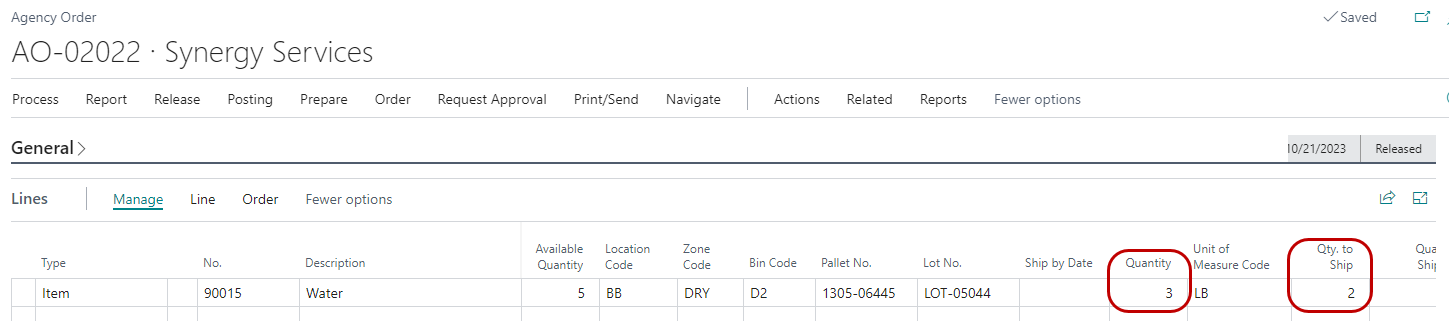
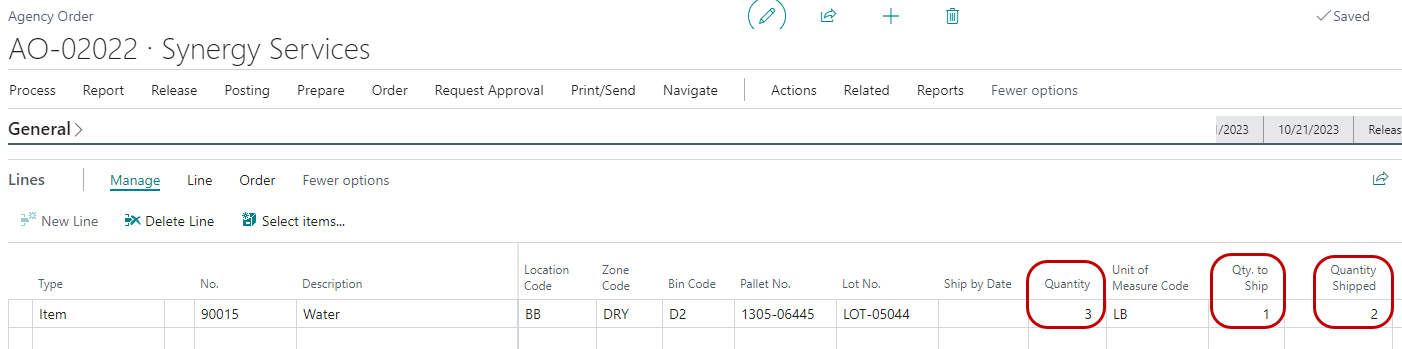
Inv. Short Handling Method of None – If the quantity shipped is less than the original order quantity, the Quantity on the Agency Order is not updated during posting to reflect what was actually shipped. This results in a remaining Qty to Ship that will need to be cleared manually. Once the Qty to Ship is deleted, then the available inventory will increase for the item for the shorted amount.
Released Agency Order – 3 cases were ordered of which 2 were shipped
Shipped Agency Order – Remaining quantity to ship of 1 which will need to be handled manually
-
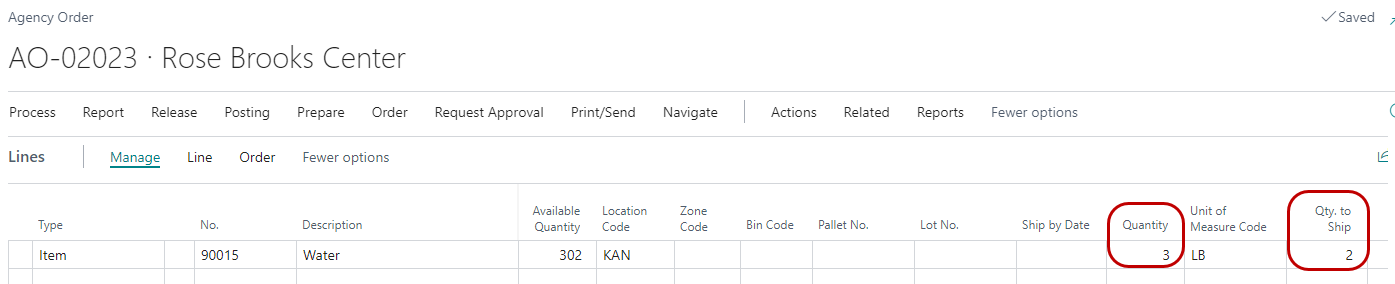
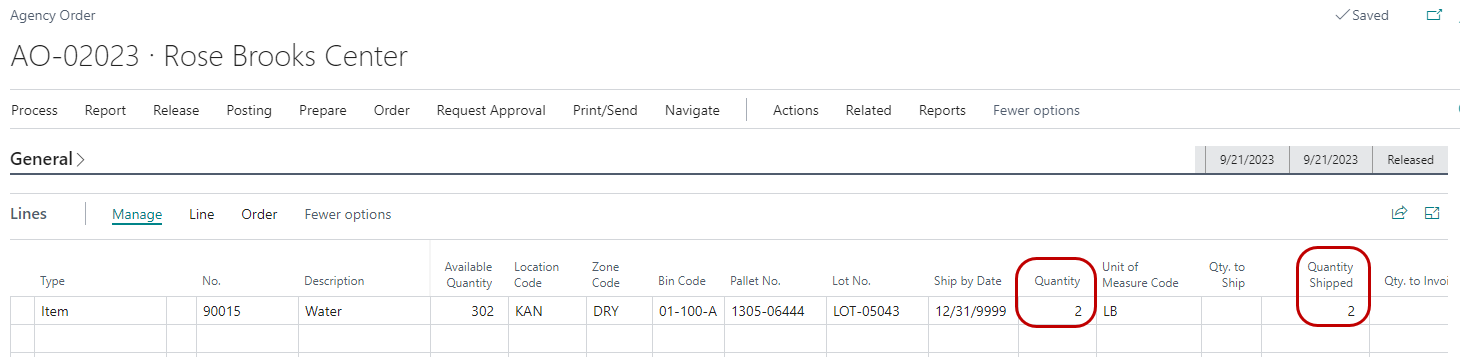
Inv. Short Handling Method of Clear to Avail Inventory – If the quantity shipped is less than the order quantity, the Quantity on the Agency Order is set to the Quantity Shipped during posting to reflect what was actually shipped. Posting also clears the remaining Qty. to Ship so a backorder is not created.
Released Agency Order – 3 ordered of which 2 were shipped
Shipped Agency Order – Quantity on the Agency Order set to 2 to reflect what was actually shipped
-
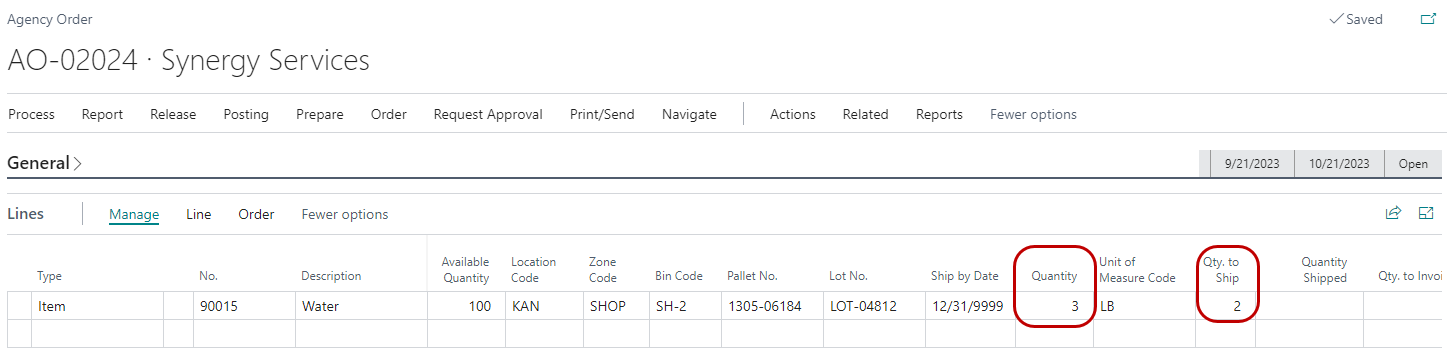
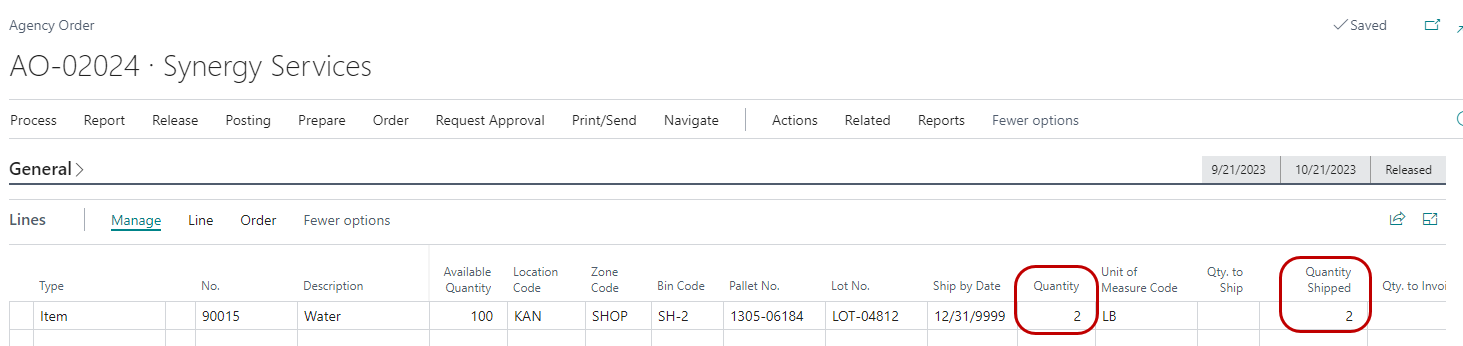
Inv. Short Handling Method of Clear to Item Journal – If the quantity shipped is less than the original order quantity, the Quantity on the Agency Order is set to Quantity Shipped during posting to reflect what was actually shipped, and a negative adjustment is created for the quantity that was shorted. Posting also clears the remaining Qty to Ship, so a backorder is not created. The negative adjustment created in the Shorts & Cuts Item Journal Batch is not posted automatically and will need to be addressed manually. Typically this is done in coordination with a daily cycle count of this item, since it is at risk of being off.
Released Agency Order – 3 ordered of which 2 were shipped
Shipped Agency Order – Quantity on the Agency Order set to 2 to reflect that quantity that was actually shipped
Below is an example of the Item Journal with the proposed adjustments to be validated before the next day’s order fulfillment. If the negative adjustment is valid, the journal line should be posted. If it is incorrect and the item/quantity is found, simply delete the line.
Item Journal – Negative Adjustment created for quantity that was not shipped (shorted)
Shipping Option 2 – Inventory Pick
Shipping Option 2 allows for the creation of at least one warehouse pick guide document for each outbound Agency Order. Thus any updates to the original order are handled on the Inventory Pick and then the Agency Order based on the Inv. Short Handling Method chosen for the Location.
-
Inv. Short Handling Method of None – If the quantity shipped is less than the original order quantity, the Quantity on the Inventory Pick is not updated during posting to reflect what was actually shipped. This results in a remaining Qty to Handle/Ship that will need to be handled manually. Once the Qty. to Ship is deleted, then the available inventory will increase for the item for the shorted amount.
Released Agency Order – 3 cases ordered
Inventory Pick – 2 handled, leaving a remaining quantity to handle of 1 that will need to be addressed manually

Shipped Agency Order – 3 shipped, leaving a remaining quantity to ship of 1 that will need to be handled manually
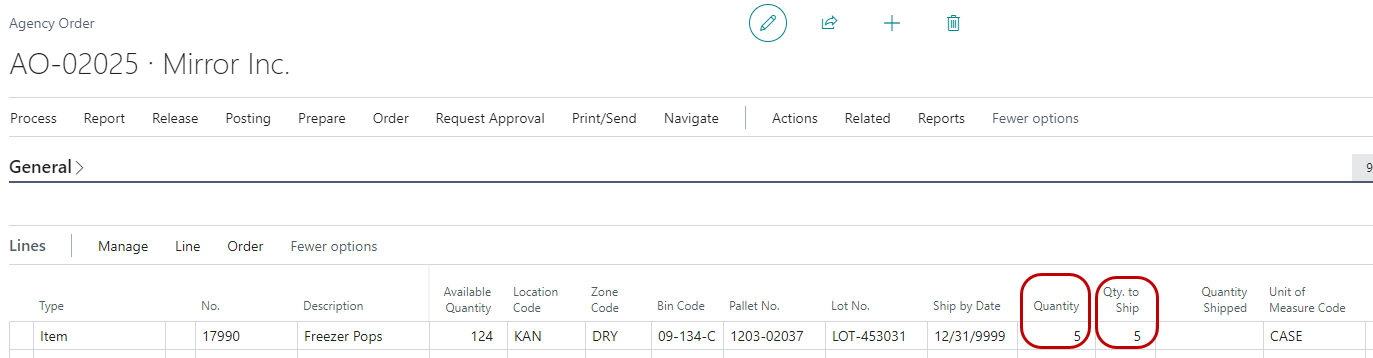
-
Inv. Short Handling Method of Clear to Avail Inventory – If the quantity shipped is less than the original order quantity, the Quantity on the Inventory Pick and the Agency Order is set to the Qty to Handle during posting to reflect what was actually shipped. Posting also clears the Qty to Handle/Ship, so a backorder is not created. The available inventory for the shorted item is increased by the shorted amount.
Released Agency Order – 3 cases ordered

Inventory Pick – 2 cases handled
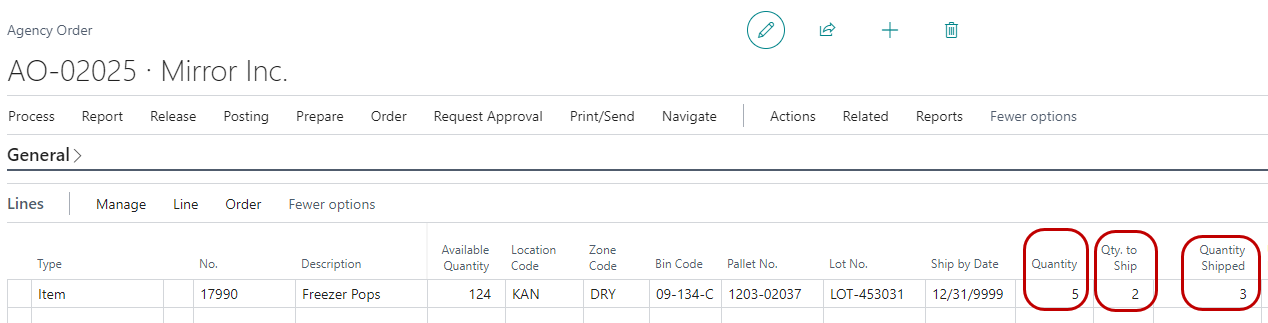
Posted Inventory Pick – Quantity shows 2 to reflect what was actually shipped
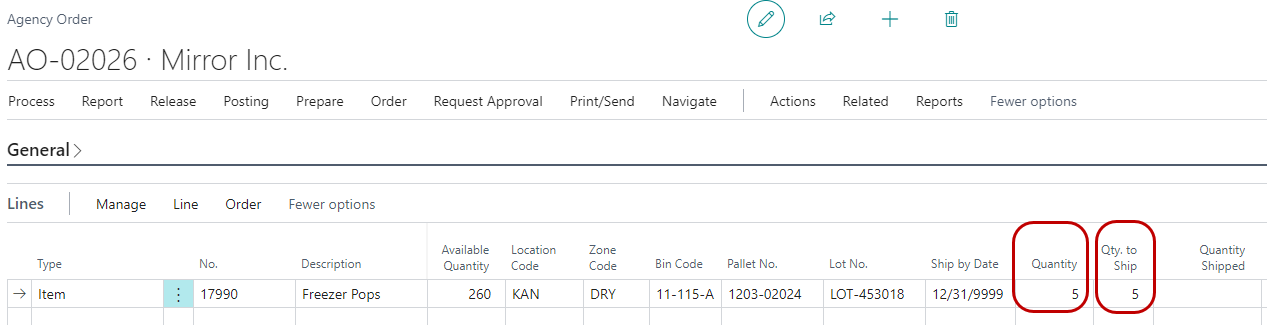
Agency Order – Quantity reset to 2 to reflect what was actually shipped

-
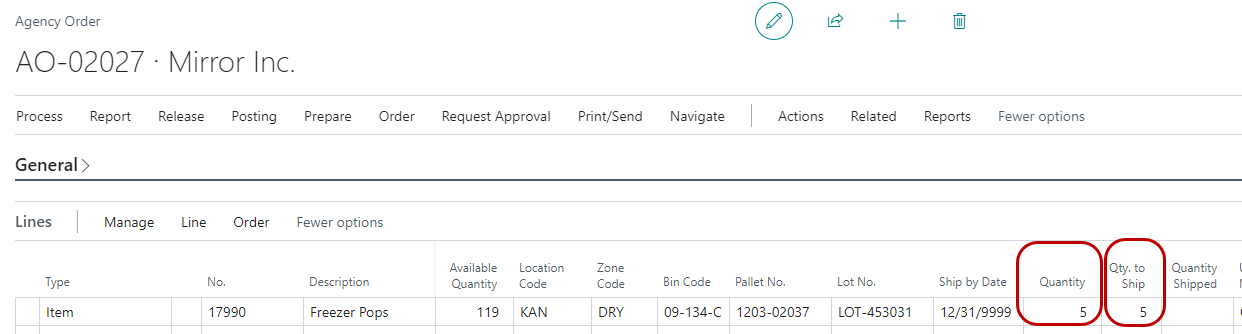
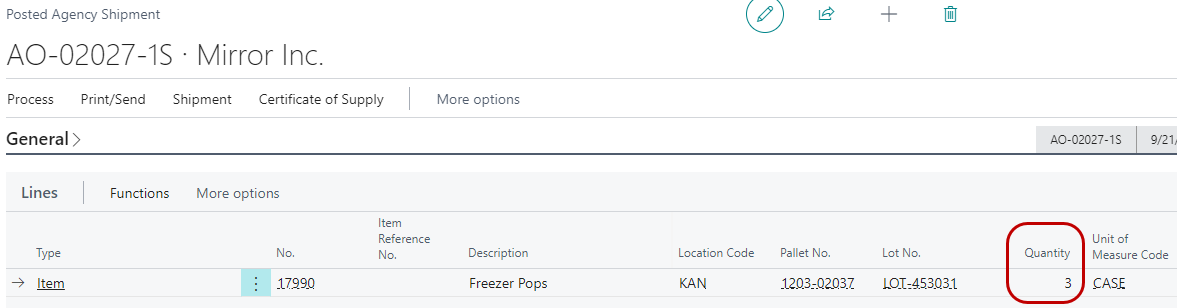
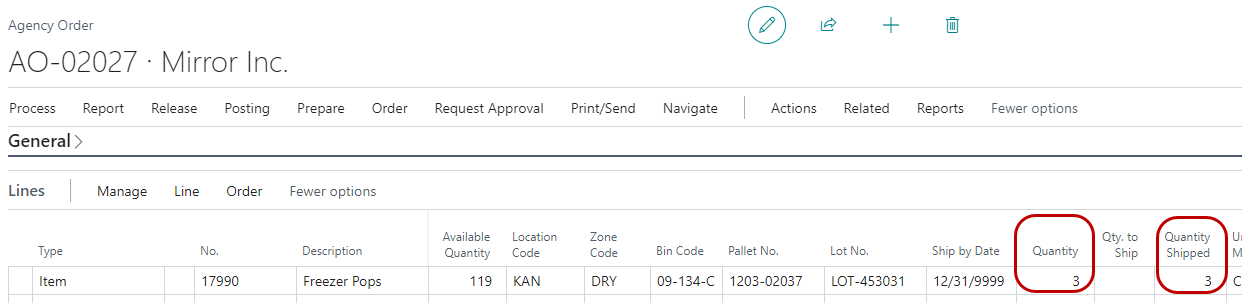
Inv. Short Handling Method of Clear to Item Journal – If the quantity shipped is less than the original order quantity, the Quantity on the Inventory Pick and the Agency Order are set to the Qty to Handle during posting to reflect what was actually shipped, and a negative adjustment is automatically created for the quantity that was shorted. Posting also clears the remaining Qty to Handle/Ship so a backorder is not created. The negative adjustment is not posted automatically and will need to be addressed manually. Typically, this is done in conjunction with a cycle count of the impacted item. In the below example, 4 cases were ordered, of which 3 were shipped.
Released Agency Order – 4 cases ordered
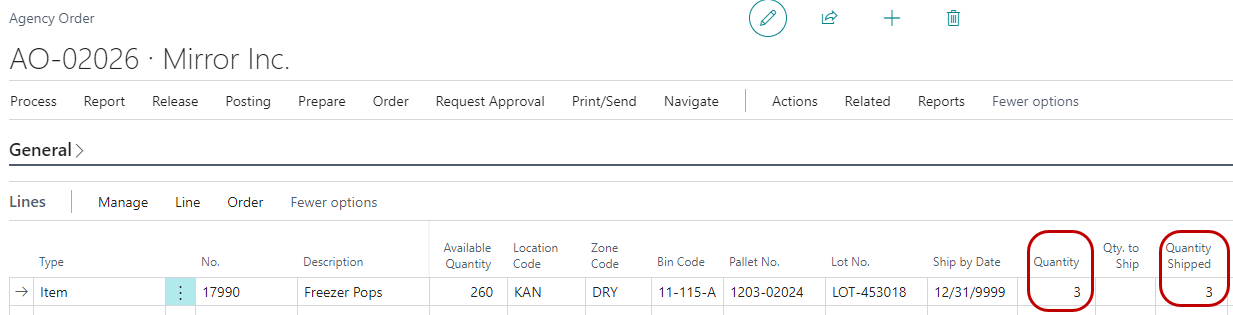
Inventory Pick – 3 cases handled
Posted Inventory Pick – Quantity reset to 3 to reflect what was actually shipped

Shipped Agency Order – Quantity reset to 3 to reflect what was actually shipped
Below is an example of the Item Journal with the proposed adjustments to be validated before the next day’s order fulfillment. If the negative adjustment is valid, the journal line should be posted. If it is incorrect and the item/quantity is found, simply delete the line.
Item Journal – Negative Adjustment created for quantity that was not shipped (shorted)
Shipping Option 3 – Warehouse Shipment
Shipping Option 3 allows for the creation of a single warehouse shipment for multiple Agency Orders. Warehouse shipment facilitates a single step posting for the shipment and does not provide for staging. Thus, any updates to the original order are handled on the Warehouse Shipment and Agency Order based on the Inv. Short Handling Method for any location set up in this manner.
-
Inv. Short Handling Method of None – If the quantity shipped is less than the original order quantity, the Quantity on the Warehouse Shipment is not updated during posting to reflect what was actually shipped. This results in a remaining Qty to Handle to Ship that will need to be handled manually. Once the Qty. to Ship is deleted, then the available inventory will increase for the item for the shorted amount. In the below examples, 5 cases were ordered, of which 4 were shipped.
Released Agency Order – 5 ordered

Posted Shipment – 4 cases shipped leaving a remaining quantity to ship of 1 that will need to be addressed manually
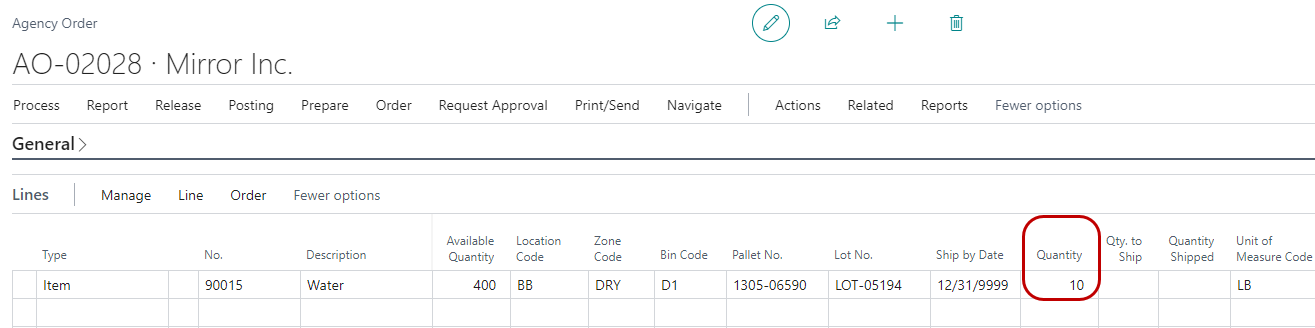
Shipped Agency Order – 4 cases shipped leaving a remaining quantity of 1 that will need to be addressed manually

-
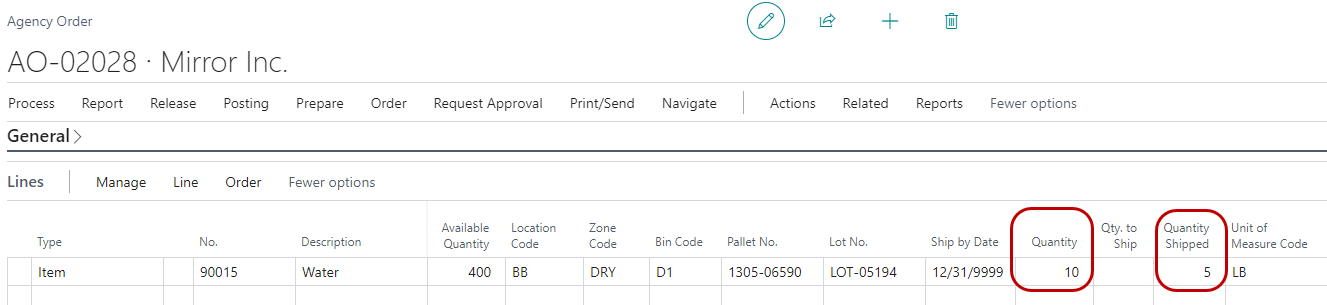
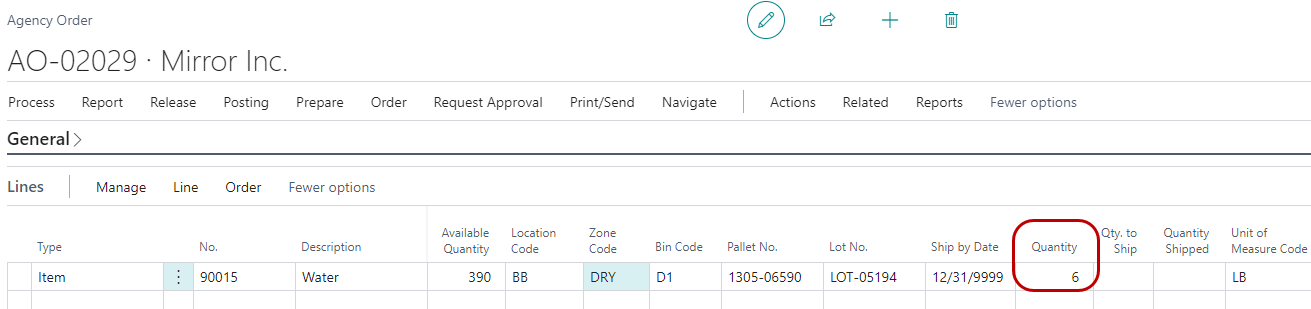
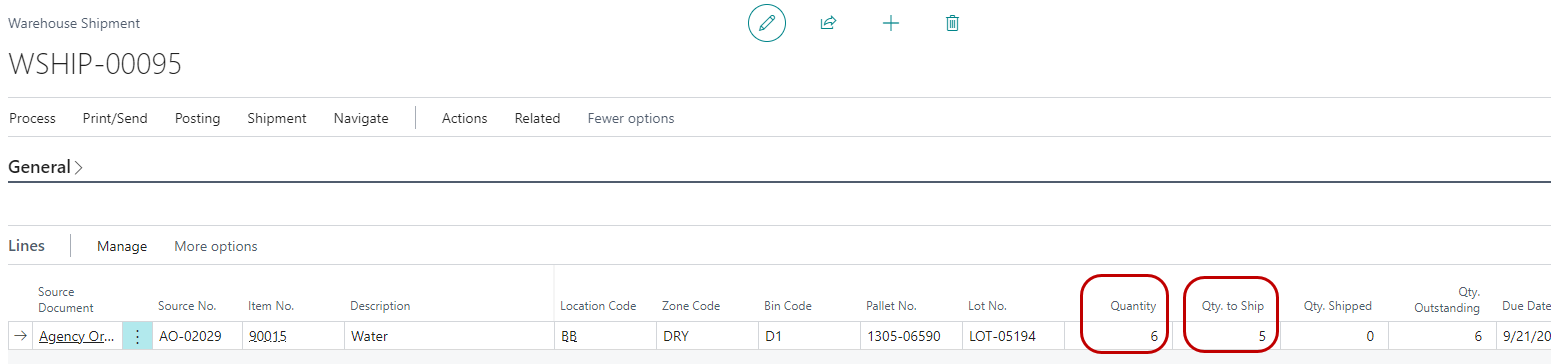
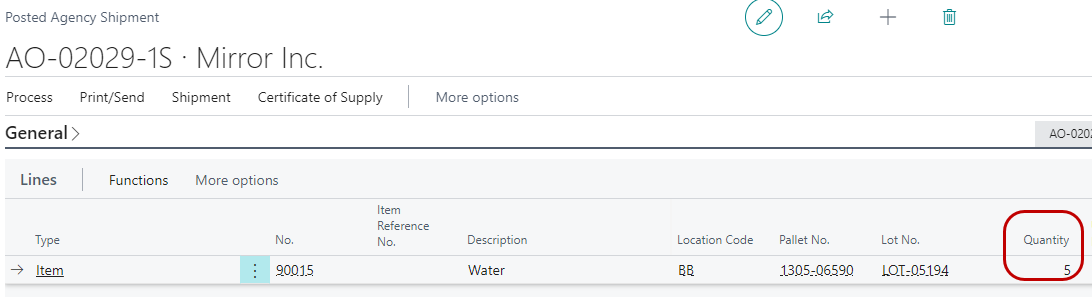
Inv. Short Handling Method of Clear to Avail Inventory – If the quantity shipped is less than the original order quantity, the Quantity on the Warehouse Shipment and the Agency Order are set to the Quantity Shipped during posting to reflect what was actually shipped. Posting also clears the Qty. to Ship so a backorder is not created. The available quantity will go up by the shorted amount. In the below example, 6 cases were ordered, of which 6 were shipped.
Released Agency Order – 6 ordered
Warehouse Shipment – 5 shipped
Posted Agency Shipment – Quantity reset to 5 to reflect what was actually shipped
Shipped Agency Order – Quantity reset to 5 to reflect what was actually shipped
-
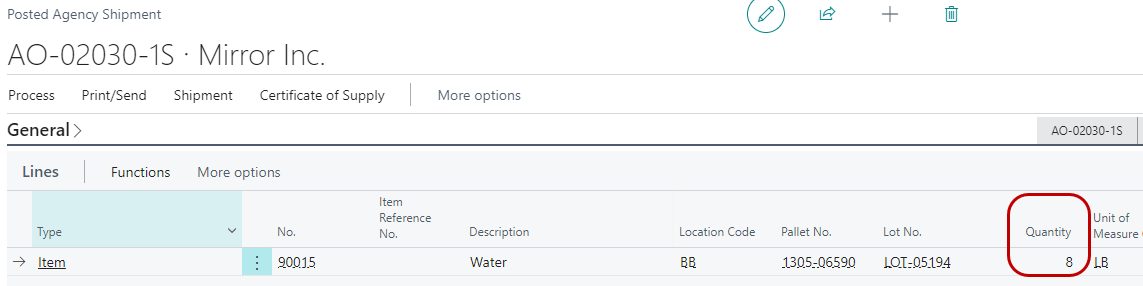
Inv. Short Handling Method of Clear to Item Journal – If the quantity shipped is less than the original order quantity, the Quantity on the Warehouse Shipment and the Agency Order are set to the Qty. to Ship during posting to reflect what was actually shipped, and a negative adjustment is automatically created for the quantity that was shorted. Posting also clears the remaining Qty. to Ship so a backorder is not created. The negative adjustment is not posted automatically and will need to be addressed manually. Typically this happens in conjunction with a daily cycle count for the impacted Item. In the below example, 6 cases were ordered, of which 5 were shipped.
Released Agency Order – 6 ordered
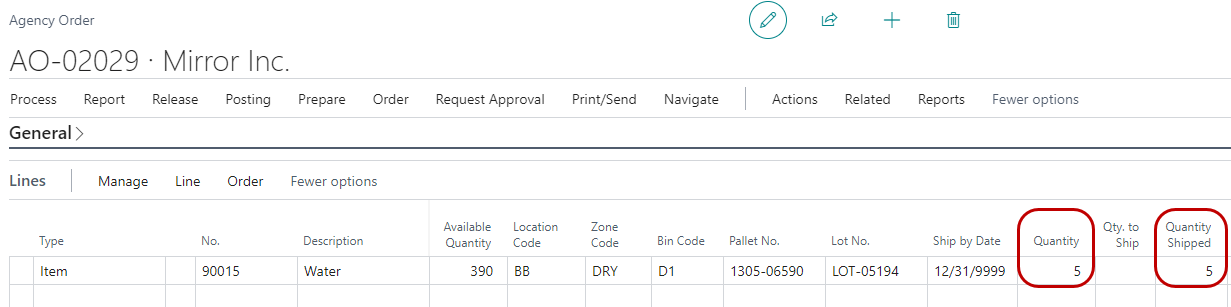
Warehouse Shipment – 5 shipped
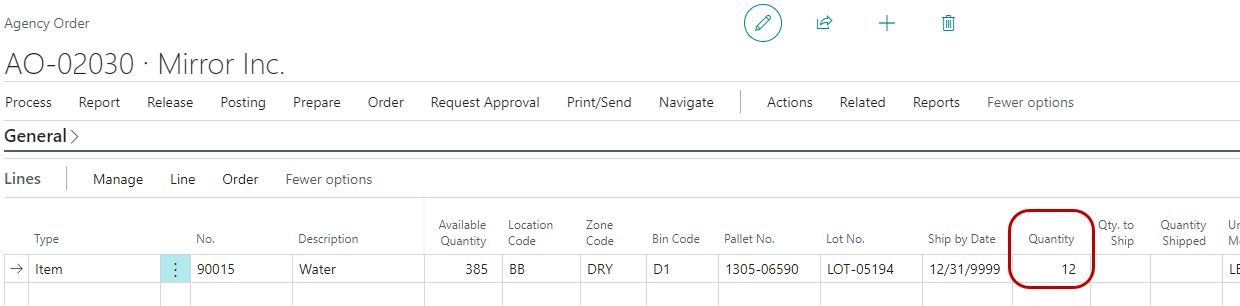
Posted Warehouse Shipment – Quantity reset to 5 to reflect what was actually shipped
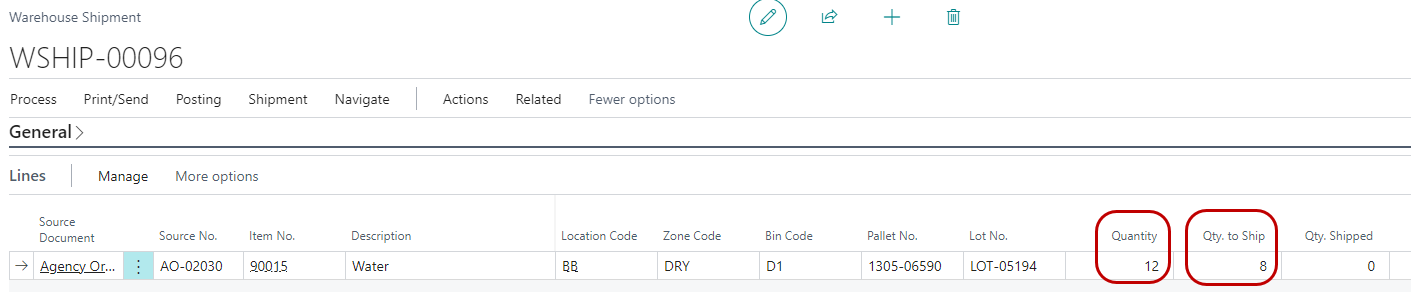
Shipped Agency Order – Quantity reset to 5 to reflect what was actually shipped
Below is an example of the Item Journal with the proposed adjustments to be validated before the next day’s order fulfillment. If the negative adjustment is valid, the journal line should be posted. If it is incorrect and the item/quantity is found, simply delete the line.
Item Journal – Negative Adjustment created for quantity that was not shipped (shorted)