Inventory Lot Costing and Pricing
This document explores how to record costs and associated inventory on a lot basis in Ceres 5. Due to fluctuation in costs related to purchased product, the rapid turnover of inventory, and the association of charges for product relative to the cost of those items, it is more representative for food banks to record costs and the associated charges for distribution of inventory on a Lot basis instead of an Item basis.
This document uses Unit Cost to indicate the value of the product and Unit Fee to indicate how much Agencies are subsequently charged for the product. Ceres tracks both Cost and Fee separately (although they may be related,) and the terms are not interchangeable.
Ceres Object release 5.00.00 is required for the functionality described in this document.
Setup
Inventory Setup
-
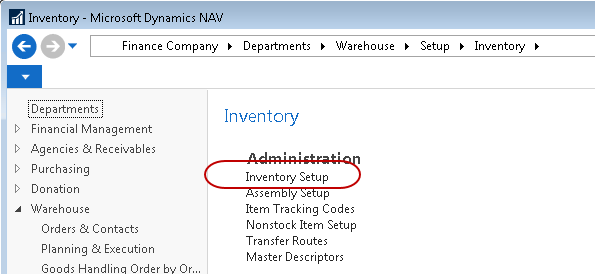
The Inventory Setup form can be accessed from Departments ▸ Warehouse ▸ Setup ▸ Inventory ▸ Inventory Setup.
-
It is recommended that both the Automatic Cost Posting and Expected Cost Posting to G/L fields be checked, and the Automatic Cost Adjustment field set to Always. These settings will ensure that costs are as accurate as possible at the time of product distribution to an Agency.
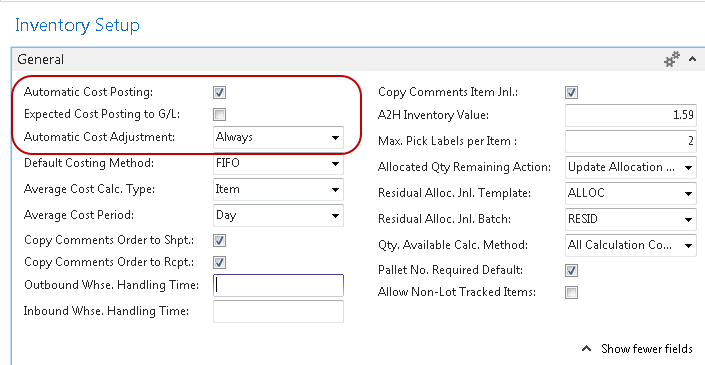
Selecting Automatic Cost Posting will automatically post to the inventory account, adjustment account, and COGS account in the general ledger when posting items from a document or journal. Selecting Expected Cost Posting will post expected costs to interim accounts. Expected costs are a preliminary cost that you expect to appear on an invoice from a vendor.
Expected costs are posted when you receive the Item, prior to Invoicing the Purchase Order. Once the actual invoice is received from the vendor, the user can adjust the Direct Unit Cost Excl. Tax to the correct amount, if necessary, and then post the Purchase Order as Invoiced.
To utilize Lot Pricing, it is important that the Calculate Agency Fees from field on the Agencies & Receivables Setup is set to Lot.
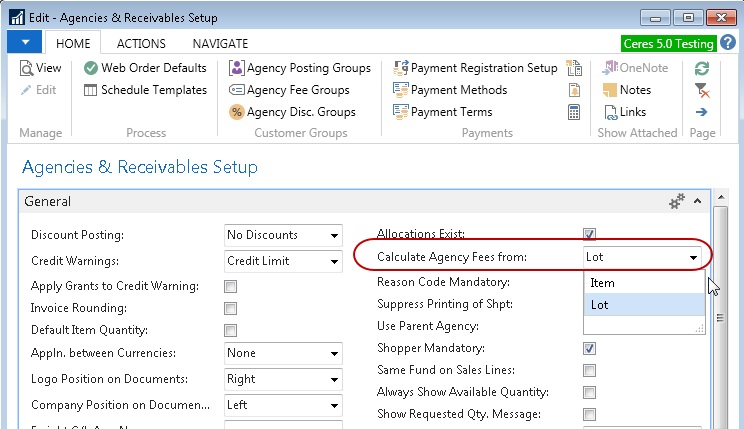
When changing to Lot, you will receive a warning. Click ‘Yes’ to change the Agency Fee calculation method.

Item Setup
-
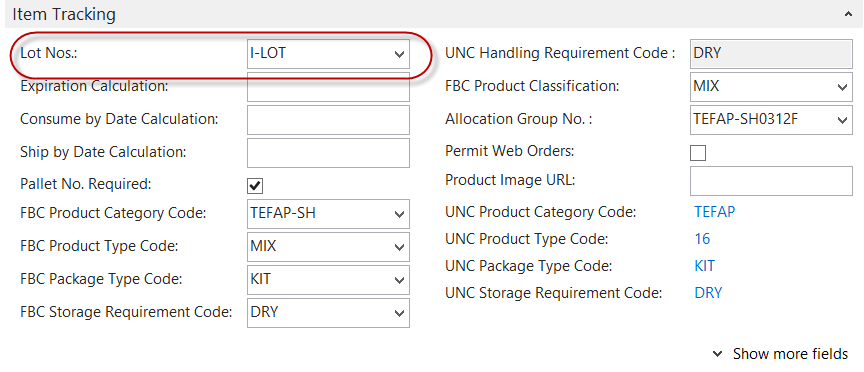
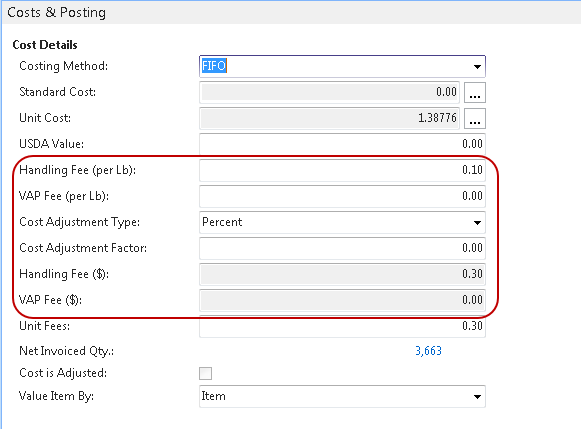
In Order for Lot Costing to function as designed, serialized lots must be used. A Lot Nos. series must be assigned on each Item Card. A sample setting on the Item Tracking FastTab is shown below:
-
The values entered for Handling Fee, VAP Fee, Cost Adjustment Type & Cost Adjustment Factor will determine the Unit Fees to be calculated for each new Lot and subsequently carried forward on to an Agency Order when the product is distributed. As each new Lot is created on a Purchase Order, these values are retrieved from the Item Card and stored on the Lot Card. If these values are changed on the Item Card, the new values will be used on all new Lots created.
noteAny existing Open Lots will not be updated with the new values, rather the values that were saved when the Lot was created will be used to calculate the various fees on an Agency order when those Lots are distributed.
Tip: To distribute purchased product to an agency with no fee, set Cost Adjustment Type to Percent, and Handling Fee, VAP Fee and Cost Adjustment Factor to 0.00.
Processing Transactions
Purchase Orders
-
When entering items on a Purchase Order using Lot Costing, after entering the Item No, the Direct Unit Cost Excl. Tax populates with the last Unit Cost for this Item. This amount can be edited as necessary prior to Posting both the receipt and the invoice. This cost posts to the Unit Cost on the Lot Card. Once the Quantity is entered, a Lot No. is automatically assigned using the setup details from the previous section.

Agency Orders
-
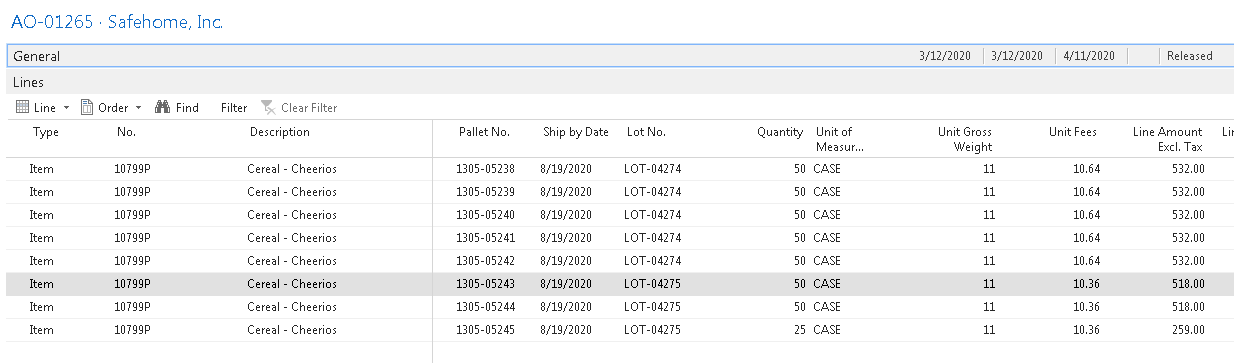
Once an item is entered on an Agency Order, lot selection is based on FEFO (First Expired, First Out). Depending on the setup, this selection is performed on a Warehouse Document or in the case of a Shopping Area, on the Agency Order itself when Released, as shown below.
-
As displayed above, multiple Lots were chosen to fulfill the Quantity entered on this Agency Order. The Unit Cost of each Lot is what was originally entered and posted on the Purchase Order.
-
The Unit Fees Excl. Tax is calculated and entered automatically based on the Lot’s Unit Cost and the value of the Handling Fee, VAP Fee, Cost Adjustment Type & Cost Adjustment Factor. The Cost Adjustment Factor and Cost Adjustment type are applied to the Lot Cost created on the Purchase Order. The Handling Fee and VAP Fee are applied from the values currently on the Item Card.
Journal Adjustments
-
When journal entries are being used to distribute or adjust Items and their associated Lots (Negative or Positive Adjustments including Physical Inventory, Item Journal Adjustments, and Kitting Adjustment Entries), Ceres will use the associated Lot Unit Cost to assign the Unit Cost/Amount on the Item Journal Line entry. If the user attempts to adjust the Unit Cost and Lot Costing is selected, the following message appears.

-
The message appears regardless of the Entry Type selected.