Posting Groups Overview
Posting groups create links between G/L accounts and other types of accounts (Vendors, Agencies, Donors) in Ceres. When users record and post agency orders, purchase orders or donation orders, posting groups provide the account mapping between the various subledgers and the general ledger. Food banks can optionally use posting groups to specify which G/L account will be used for groups of items, vendors, agencies, etc. For example, a food bank can use posting groups to specify that the value of donated and purchased inventory should be tracked in separate balance sheet accounts.
Ceres Object releases 4.00 and higher are required for the functionality described in this document.
Posting Group Types
Posting groups are referred to as either "Specific" or "General" depending upon whether they primarily target the balance sheet or income statement sections of the G/L respectively.
There is no restriction on which G/L accounts are assigned to each posting group.
Specific posting groups connect the following subledgers to the balance sheet section of the G/L (although Ceres does not actually limit you to using only balance sheet accounts).
-
Agencies use Agency Posting Groups (or Customer Posting Groups depending on the version of Ceres) to map accounts receivable accounts, payment discounts accounts, invoice and application rounding accounts, and interest and fee accounts relating to agencies.
-
Vendors use Vendor Posting Groups to map accounts payable accounts, payment discount accounts, invoice and application rounding accounts, and interest and fee accounts relating to vendors. In Ceres, Donors are a subset of Vendors, so the Vendor Posting Groups apply to Donors as well.
-
Items uses Inventory Posting Setup to map inventory accounts, WIP (work in progress) account, and other variance accounts relating to inventory in the chart of accounts. Items are different from other posting groups in that the Inventory Posting Groups table provides an additional description field, and the Inventory Posting Setup is combined with the Location Code to allow food banks to use different G/L accounts for inventory in multiple locations.
-
Bank Accounts use Bank Account Posting Groups to connect bank account records to their associated asset account in the G/L.
-
Fixed Assets use FA Posting Groups to specify the accounts to which transactions involving fixed assets are posted.
Any of the above posting groups only need to be set up if the food bank is using that feature of Ceres. For example, many food banks do not have G/L accounts set up for agency payment discounts, payment tolerances or fixed assets. A G/L account can also be used multiple times in posting setup. The same G/L account could be used for different entries (accounts payable and vendor discounts hit the same account) or different posting groups (purchases and government purchases hit the same account).
If a general ledger account that is required by a subledger has not been entered in a posting group, Ceres will display an error message describing the problem.
General posting groups connect the following subledgers to the income statement section of the G/L (again, Ceres does not limit you to using only income statement accounts).
-
Agencies, Vendors and Donors can use General Business Posting Groups to segregate a subset of these groups into different income statement accounts. Most food banks do not use this and have only one General Business Posting Group. Note that some features in Ceres require a blank General Business Posting Group, so each record is duplicated in General Posting Seutp.
-
Items use General Product Posting Groups to segregate different classes of items into different G/L accounts. A typical use for this is to separate the acquisition and distribution of donated, government and purchased product into different income statement accounts.
-
General Posting Setup maps a combination of General Business Posting Group and General Product Posting Group to donations, purchases, sales, item journals, cost of goods sold and other entries to income statement G/L accounts. This is also used to set up interim accounts for expected entries generated when using the Expected Cost feature.
Posting Groups in Use
Consistent with double-entry accounting and the need for a variety of subsidiary accounts, each posting in Ceres can make many individual entries. For example, purchasing inventory (with expected cost) will affect inventory, inventory interim, A/P and inventory accrual accounts on the balance sheet; purchases and direct cost applied accounts on the income statement; and the vendor’s account.
Posting groups allow you to determine exactly which and how many G/L accounts will be used when Ceres makes each posting. You may combine transactions into a single account when it’s not necessary to keep the transactions segregated. For example, many food banks combine the purchases, direct cost applied and COGS accounts because they don’t need to be in separate G/L accounts. Note that Ceres still allows you to separate the postings by entry type or description if that detail is needed for another reason.
Purchased Product Posting Group Flow
The acquisition and distribution of purchased product uses the following posting setup columns. T-account diagrams follow each individual transaction for illustration.
-
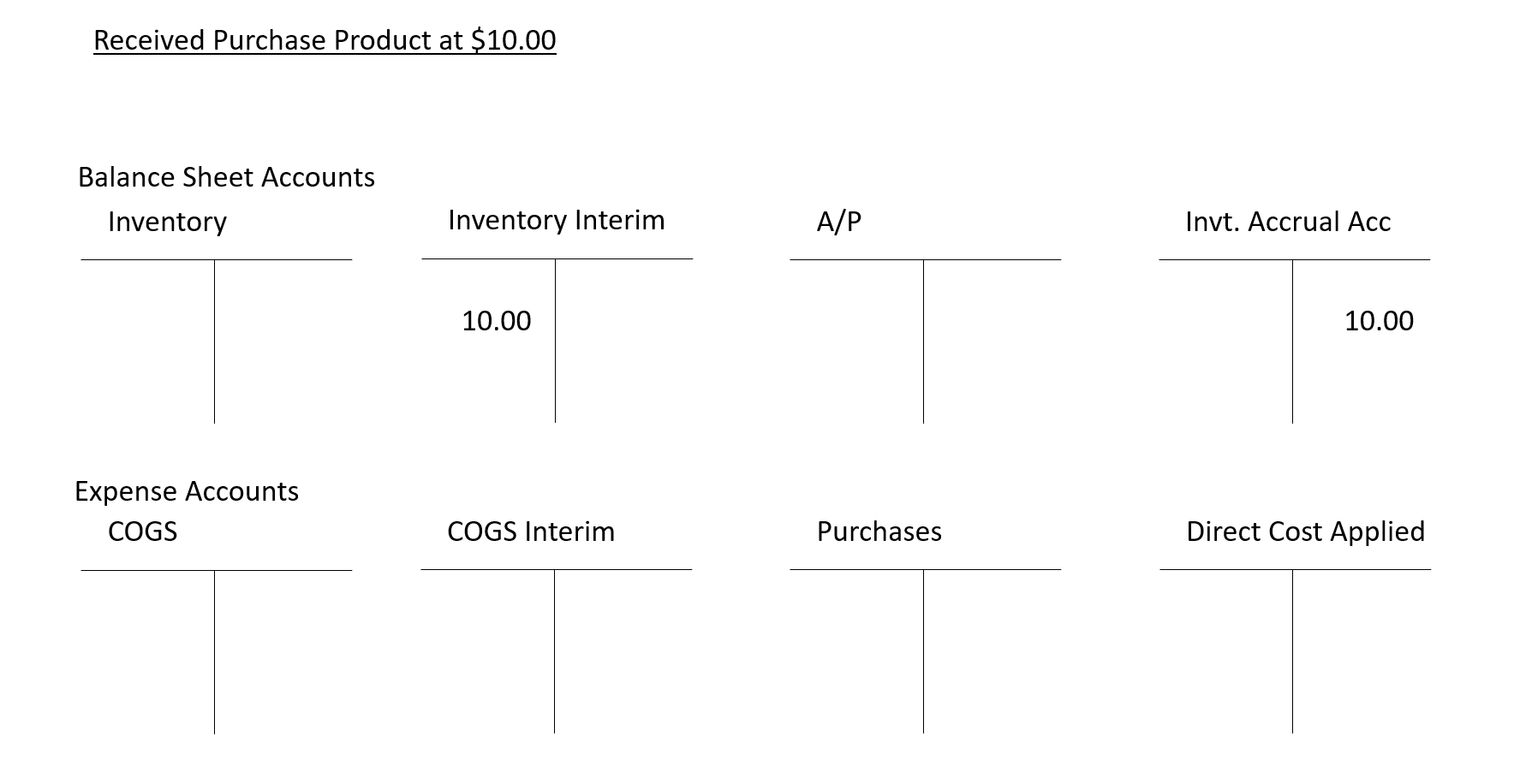
Product Received from Vendor (with expected cost on). This tracks the expected value of the product but will be reversed when the invoice with the exact cost is posted. If Expected Cost is not turned on, no postings will be made to the G/L when product is received.
-
Dr. Inventory Account (Interim) – Inventory Posting Setup – Asset
-
Cr. Invt. Accrual Account (Interim) – General Posting Setup – Liability
-
-
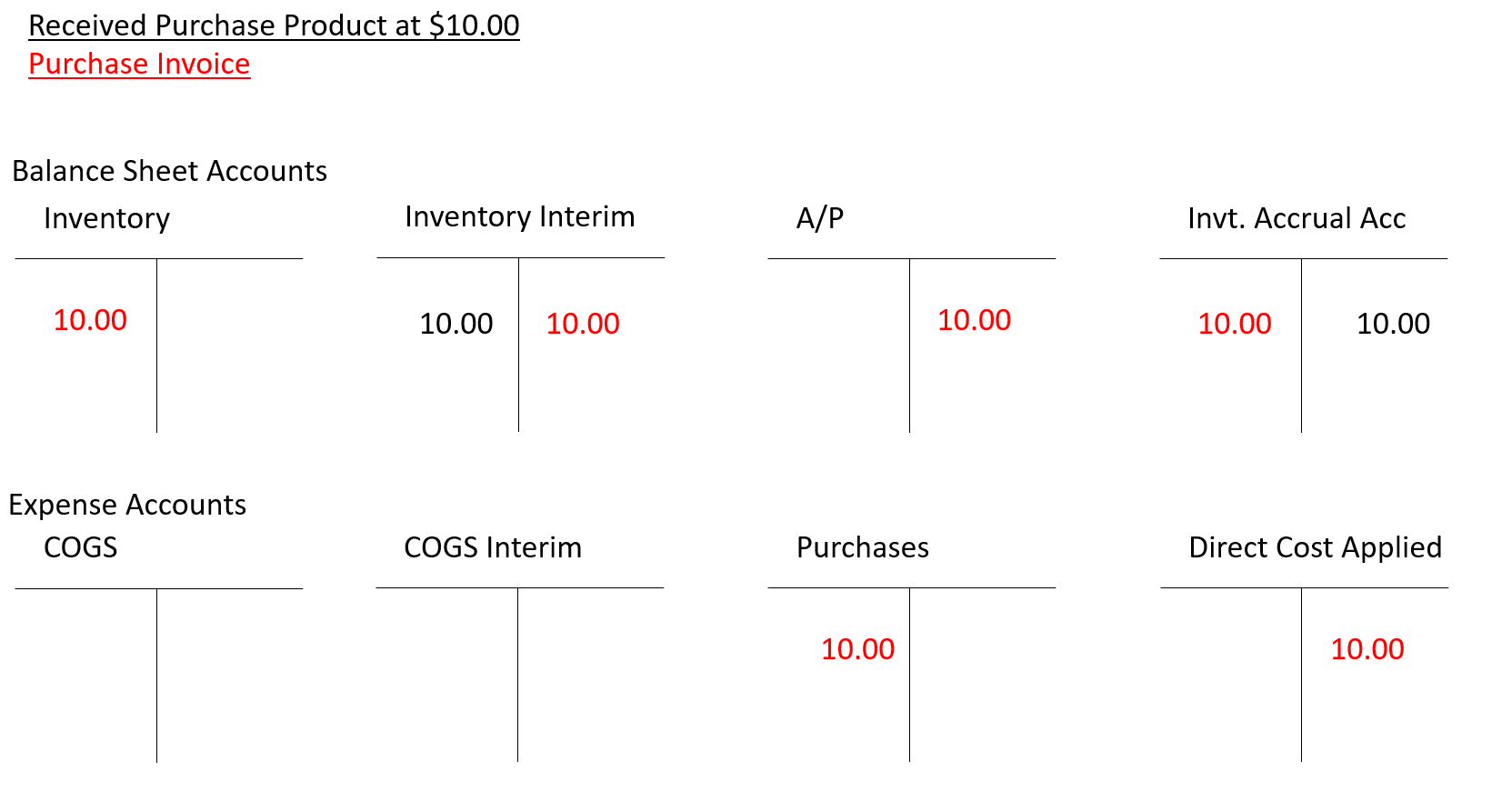
Vendor Invoice Received (with expected cost on). This reverses the expected value of the product and posts the exact value from the invoice. It also records the payable and the offsetting purchase expense.
-
Cr. Inventory Account (Interim) – Inventory Posting Setup – Asset
-
Dr. Invt. Accrual Account (Interim) – General Posting Setup – Liability
-
Dr. Inventory Account – Inventory Posting Setup – Asset
-
Cr. Direct Cost Applied – General Posting Setup – Expense
-
Dr. Purch. Account – General Posting Setup – Expense
-
Cr. Payables Account – Vendor Posting Groups – Liability
-
-
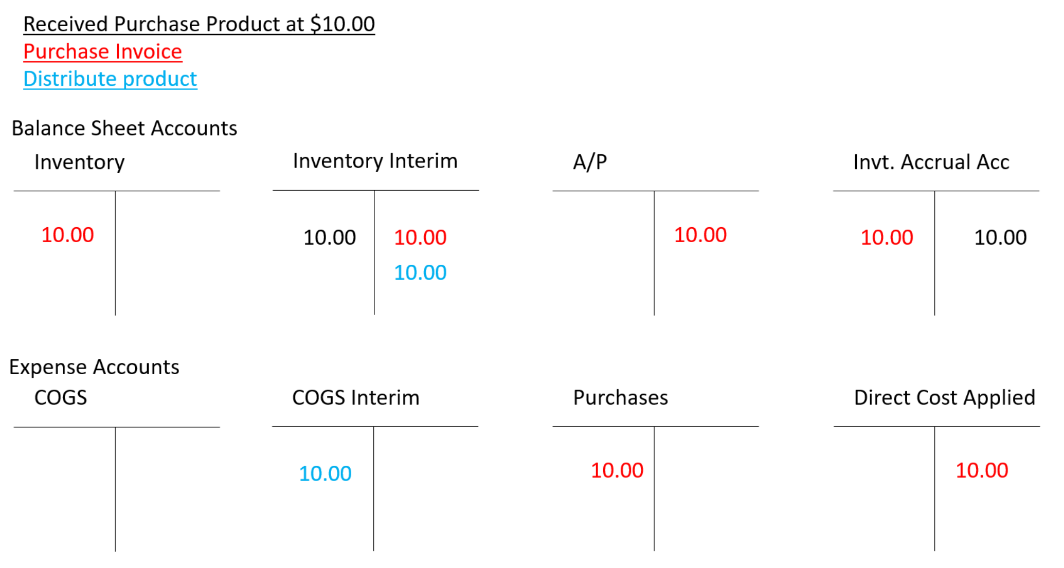
Agency Order shipped. This records the expected expense to the interim cost of goods sold account, removing product from the interim inventory account.
-
Dr. COGS Account (Interim) – General Posting Setup – Expense
-
Cr. Inventory Account (Interim) – Inventory Posting Setup – Asset
-
-
Agency Order Invoiced. This reverses the above interim posting and records the actual expense to the cost of goods sold account, removing product from the inventory account. It also records the revenue for any fees with an offsetting entry to accounts receivable.
-
Cr. COGS Account (Interim) – General Posting Setup – Expense
-
Dr. Inventory Account (Interim) – Inventory Posting Setup – Asset
-
Dr. COGS Account – General Posting Setup – Expense
-
Cr. Inventory Account – Inventory Posting Group – Asset
-
Dr. Accounts Receivable – Customer Posting Groups – Asset
-
Cr. Sales Account – General Posting Setup – Revenue
-
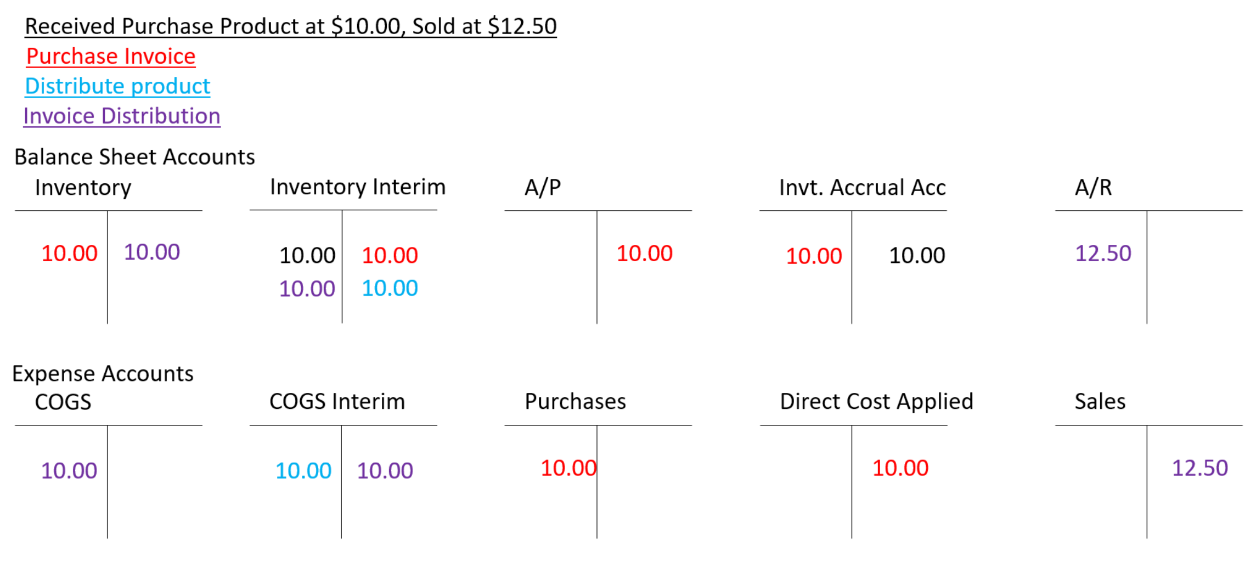
Many food banks choose to combine Purchases and Direct Cost Applied Accounts into a single G/L account. Others combine Purchases, Direct Cost Applied and COGS expense accounts into one Cost of Goods account.
Purchased Product Credit Memos
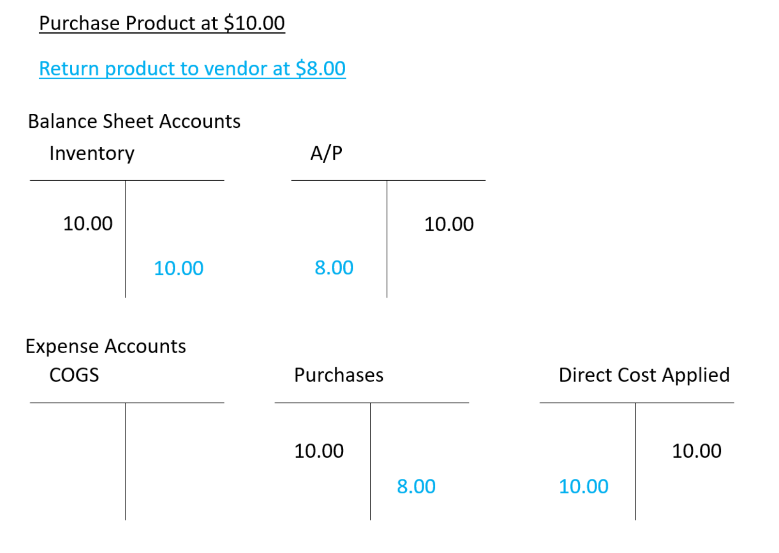
A vendor credit memo for purchased product uses the following posting setup columns. The example returns the product at a lower price than the purchase to show how that posts.
-
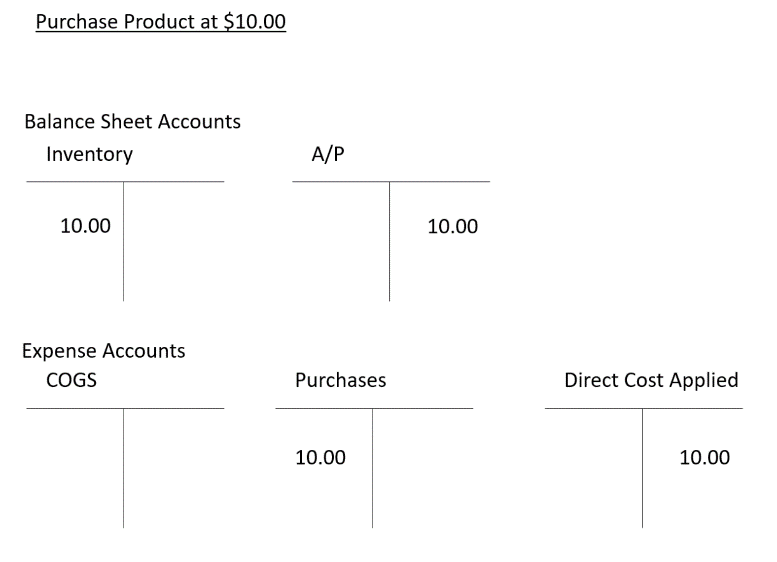
Product and Vendor Invoice Received (expected cost postings not shown).
-
Dr. Inventory Account – Inventory Posting Setup – Asset
-
Cr. Direct Cost Applied – General Posting Setup – Expense
-
Dr. Purch. Account – General Posting Setup – Expense
-
Cr. Payables Account – Vendor Posting Groups – Liability
-
**
**
-
Product Returned and Credit Memo Created (expected cost postings not shown). Note that the Purchases expense account and A/P liability account will show the $2 difference. Since the product has been returned, the $2 expense is not classified as cost of goods sold.
-
Dr. Inventory Account – Inventory Posting Setup – Asset
-
Cr. Direct Cost Applied – General Posting Setup – Expense
-
Dr. Purch. Account – General Posting Setup – Expense
-
Cr. Payables Account – Vendor Posting Groups – Liability
-
Donated Product Posting Group Flow
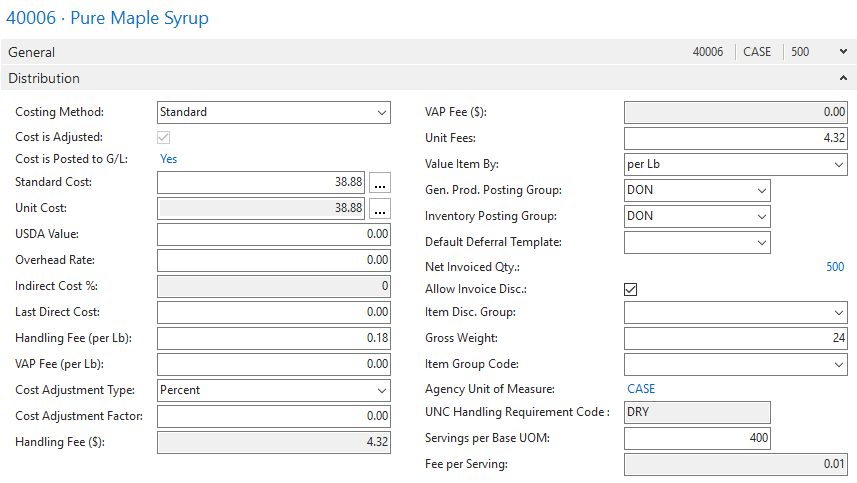
Donated product is unusual in that the acquisition of the inventory is considered revenue to the food bank. Ceres uses the “Purchase Variance” account to track the receipt of donated inventory as revenue. Unlike purchased items, which get their value assigned from the Purchase Order or Purchase Invoice, donated items get their values from settings on the Item card. The following examples assume that donated items are in donation-specific Posting Groups, that the Item Cards are set to a Costing Method of Standard, and that the items are assigned a Standard Cost. (Note that this is a 24 lb. donated item being valued at $1.62/lb.)
-
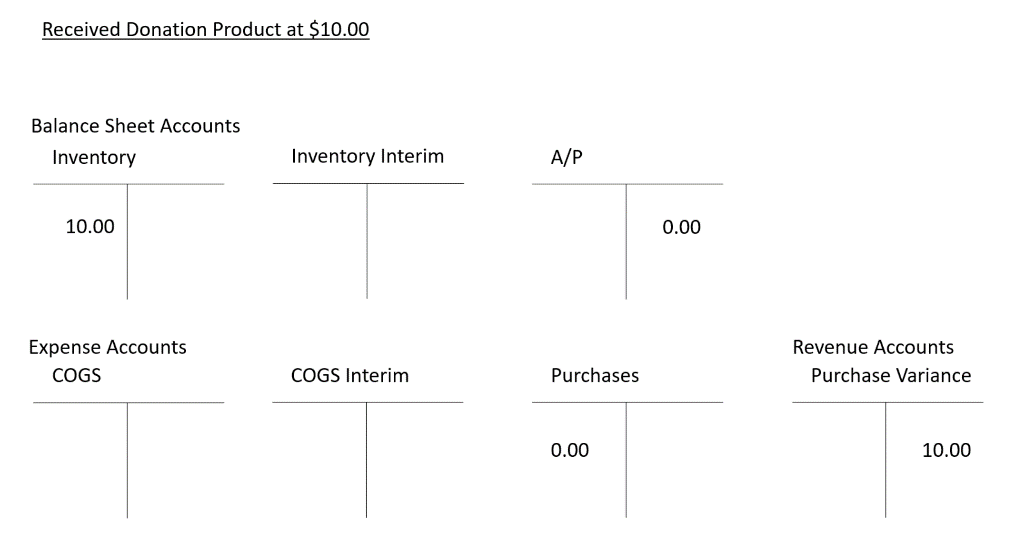
Product Received from Donor. When the donation order is received, Ceres immediately posts to the inventory and revenue (Purchase Variance) accounts. It also makes $0.00 dummy postings to the Purchases and A/P accounts.
-
Dr. Inventory Account – Inventory Posting Setup – Asset
-
Cr. Purchase Variance Account – General Posting Setup – Revenue
-
Dr. Purch. Account – General Posting Setup – Expense
-
Cr. Payables Account – Vendor Posting Groups – Liability
-
-
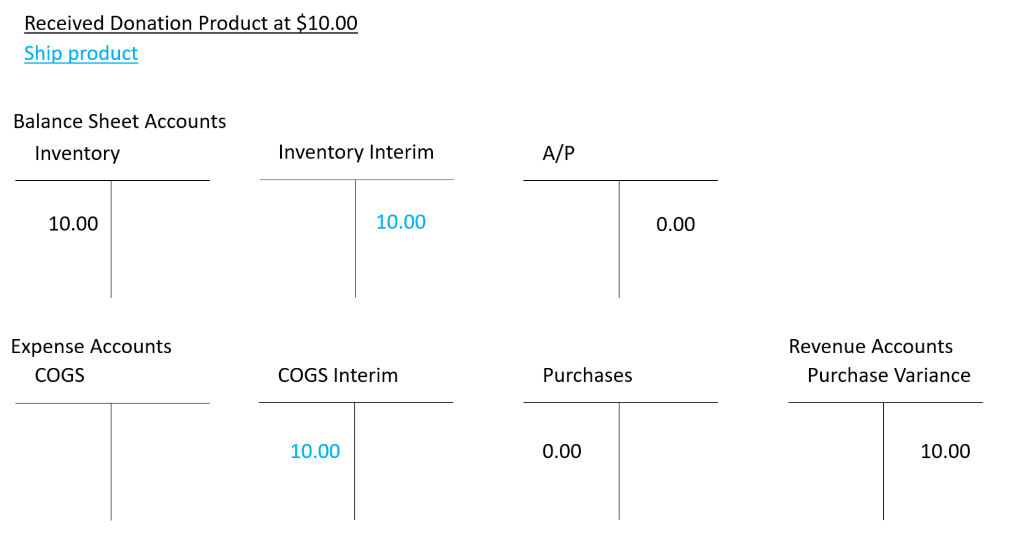
Agency Order Shipped. When donated product is distributed to agencies, Ceres records the expected expense to the interim cost of goods sold account, removing product from the interim inventory account.
-
Dr. COGS Account (Interim) – General Posting Setup – Expense
-
Cr. Inventory Account (Interim) – Inventory Posting Setup – Asset
-
-
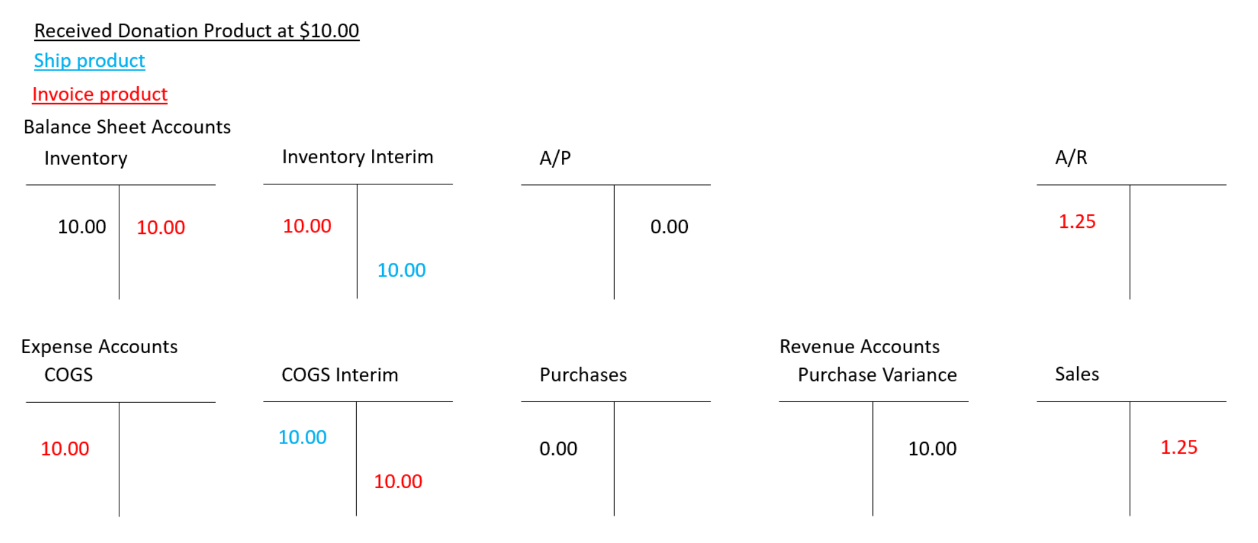
Agency Order Invoiced. This reverses the above interim posting and records the actual expense to the cost of goods sold account, removing product from the inventory account. It also records the revenue for any fees with an offsetting entry to accounts receivable.
-
Cr. COGS Account (Interim) – General Posting Setup – Expense
-
Dr. Inventory Account (Interim) – Inventory Posting Setup – Asset
-
Dr. COGS Account – General Posting Setup – Expense
-
Cr. Inventory Account – Inventory Posting Group – Asset
-
Dr. Accounts Receivable – Agency (Customer) Posting Groups – Asset
-
Cr. Sales Account – General Posting Setup – Revenue
-
Kitting
The acquisition of purchased or donated items used to make kits, and the shipping and invoicing of the finished good kits themselves use the same posting group setups as listed above. The break bulk and consume/output steps, however, use additional columns in the general and inventory posting setup pages. Those are:
-
WIP Account – Inventory Posting Setup – Asset. This account records entries during the consume and output phases of advanced kitting. This can be considered a clearing account.
-
Cost of Disassembly Account – General Posting Setup – Expense. This account is used to record additional costs when disassembling kits.
Grants
The Grants module links a specified Grants Dimension to the Grants subledger. Grants can be assigned to different Grant Posting Groups which can direct grant transactions to specific GL accounts. Grants funds are then used through Agency Orders, Purchase Orders or Purchase Invoices, which …
(NEED TO WALK THROUGH THIS TO SEE WHAT TRANSACTIONS ARE AFFECTED.)
Posting Group Fields
The following tables list the intended purpose for each GL Account field in each of the posting groups setup areas in Ceres. GL Section is illustrative only.
Agency Posting Groups
| Field Name | GL Section | Account Purpose |
|---|---|---|
| Receivables Account | Asset | To record agency receivables |
| Service Charge Acc. | Revenue | To track service charge revenue on agency orders. Not typically used in Ceres. |
| Payment Disc. Debit Acc. | Expense | To record agency payment discounts. Not typically used in Ceres. |
| Payment Disc. Credit Acc. | Expense | To record reductions in agency payment discounts. Not typically used in Ceres. |
| Debit Rounding Account | Expense | To record adjustments due to rounding on agency payments. Not typically used in Ceres. |
| Credit Rounding Account | Expense | To record adjustments due to rounding on agency payments. Not typically used in Ceres. |
Vendor Posting Groups
| Field Name | GL Section | Account Purpose |
|---|---|---|
| Payables Account | Liability | To record payables |
| Service Charge Acc. | Expense | To track service charge expenses on purchase orders and invoices. Not typically used in Ceres. |
| Payment Disc. Debit Acc. | Expense | To record reductions in vendor invoice discounts. Not typically used in Ceres. |
| Payment Disc. Credit Acc. | Expense | To record vendor invoice discounts. Not typically used in Ceres. |
| Debit Rounding Account | Expense | To record adjustments due to rounding on vendor invoices. Not typically used in Ceres. |
| Credit Rounding Account | Expense | To record adjustments due to rounding on vendor invoices. Not typically used in Ceres. |
Inventory Posting Setup
| Field Name | GL Section | Account Purpose |
|---|---|---|
| Inventory Account | Asset | To record inventory |
| Inventory Account (Interim) | Asset | To record inventory that has been received but not invoiced when using Expected Cost features. |
| WIP Account | Asset | To record entries during the consume and output phases of advanced kitting. |
| Variance/Overhead Accounts | n/a | Not used in Ceres. |
Bank Account Posting Groups
| Field Name | GL Section | Account Purpose |
|---|---|---|
| G/L Bank Account No. | Asset | To record bank account transactions. |
FA Account Posting Groups
Additional fixed asset posting group fields are available but are not listed here.
| Field Name | GL Section | Account Purpose |
|---|---|---|
| Acquisition Cost Account | Asset | To record the acquisition cost of fixed assets |
| Accum. Depreciation Account | Asset | To record the accumulated depreciation of fixed assets. |
| Acq. Cost Acc. on Disposal | Expense | To record the acquisition cost of a fixed asset at disposal. |
| Accum. Depr. Acc. on Disposal | Expense | To record the accumulated depreciation of a fixed asset at disposal. |
| Gains Acc. on Disposal | Revenue | To record gains on a fixed asset at disposal. |
| Losses Acc. on Disposal | Expense | To record losses on a fixed asset at disposal |
| Depreciation Expense Acc. | Expense | Do record depreciation expense on a fixed asset. |
| Write-Down Account | Expense | To write down the value of a fixed asset. |
Grant Posting Groups
| Field Name | GL Section | Account Purpose |
|---|---|---|
| Grants Receiving | Liability | To record grants received |
| Grants Usage | Asset | To record the usage of a grant |
| Grants Allocated Not Paid | Asset | To record unpaid purchase invoices with grant usage applied |
General Posting Setup
This section details how you want specific product types (General Product Posting Groups) to be mapped for their entries. For example, donated product will hit a revenue account and inventory, while purchased product will hit an expense account and inventory.
| Field Name | GL Section | Account Purpose |
|---|---|---|
| Agency Fees Account1 | Revenue | To record revenue from agency fees or other sales revenue |
| Agency Credit Memo Account | Revenue | To record credit memos applied to agency fees or other sales |
| Agency Line Disc. Account | Revenue | To record discounts on individual line items on Agency Invoices. Not typically used in Ceres. |
| Agency Inv. Disc. Account | Revenue | To record discounts on entire Agency Invoices. Not typically used in Ceres. |
| Agency Pmt. Disc. Debit/Credit Acc. | Expense | To record payment discounts, e.g., 2% NET 30. Not typically used in Ceres. |
| Agency Prepayment Account | Liability | To record agency prepayments. |
| Purch. Account | Expense | To record vendor purchases |
| Purch. Credit Memo Account | Expense | To record vendor credit memos |
| Purch Prepayment Account | Asset | To record vendor prepayments |
| COGS Account | Expense | To record cost of goods sold when product is distributed |
| COGS Account (Interim) | Expense | To record cost of goods sold when product is distributed before it has been invoiced from the vendor. Used with Expected Cost in Ceres. |
| Invt. Accrual Acc. (Interim) | Asset | To record inventory value when product is received but not yet invoiced from the vendor. Used with Expected Cost in Ceres. |
| Inventory Adjmt. Account | Expense | To record adjustments to inventory, e.g., the Adjust Cost/Item Entries batch job |
| Direct Cost Applied Account | Expense | To record inventory cost as product is acquired |
| Overhead Applied Account | Expense | To record overhead cost. Not typically used in Ceres |
| Purchase Variance Account | Expense | To record the difference between expected cost and actual cost when using Expected Cost in Ceres. |
| Cost of Disassembly Account | Expense | Used to record costs when disassembling kits. |
Related Topics
- Chart of Accounts Overview
- Kitting Overview
- Donation Order Overview
- Purchase Order Overview
- Purchase Credit Memo Overview