Distribution Pounds by County Report with XML Export
The Distribution Pounds by County Report in Ceres 5 includes an option to generate an XML file for upload to HungerNet. This document covers the export process.
Ceres Object release 5.00.00 is required for the functionality described in this document.
Setup
Prior to generating the Report and/or XML file for upload to HungerNet, the following setup steps need to be completed. For additional detail on the report, please see the Feeding America Reporting Procedure.
-
UNC County Codes
- Verify with Feeding America that the import process has been run to populate the UNC County Codes.
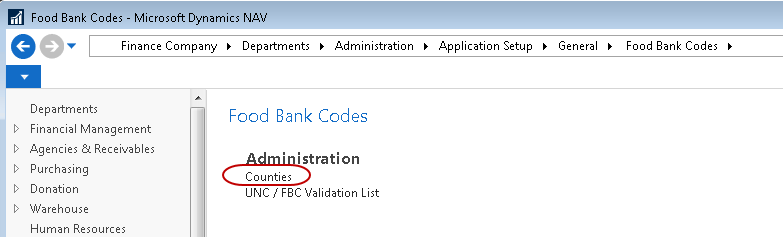
- The UNC County Codes can be accessed from Departments ▸ Administration ▸ Application Setup ▸ General ▸ Food Bank Codes ▸ Counties.
-
Link the FBC County Code to the appropriate UNC County FIPS Code.
- For each FBC County Code listed, select the appropriate UNC County FIPS Code from the edit assist list or enter it manually.

Mobile Pantry Drops Indicator
-
An indicator has been added to the Information FastTab of the Agency Card to designate if Agency Orders from the Agency should be considered Mobile Pantry Drop orders.
-
The Agency List can be accessed from Departments ▸ Agencies & Receivables▸ Agency Relations ▸ Lists ▸ Agencies.
-
Once an Agency is selected, Click Edit on the Home ribbon to edit the details of that Agency.

-
If the Mobile Pantry indicator on the Agency Card is selected, the user will be prompted with the following:

A “Yes” answer will set the Mobile Pantry indicator on the Agency Card and on all posted Agency Orders for that Agency. The Mobile Pantry Drop indicator will also be defaulted to “Yes” for any new Agency Orders for this Agency.
A “No” answer will set the Mobile Pantry indicator on the Agency Card and the Mobile Pantry Drop indicator will be defaulted to “Yes” for any new Agency Orders for this Agency. No existing transactions will be updated.
noteWhile the Mobile Pantry indicator will be defaulted to “Yes” on any new Agency Orders, the indicator can be set to “No” on an Agency Order if that specific Agency Order is not a Mobile Pantry Drop.
Distribution Pounds by County Report
-
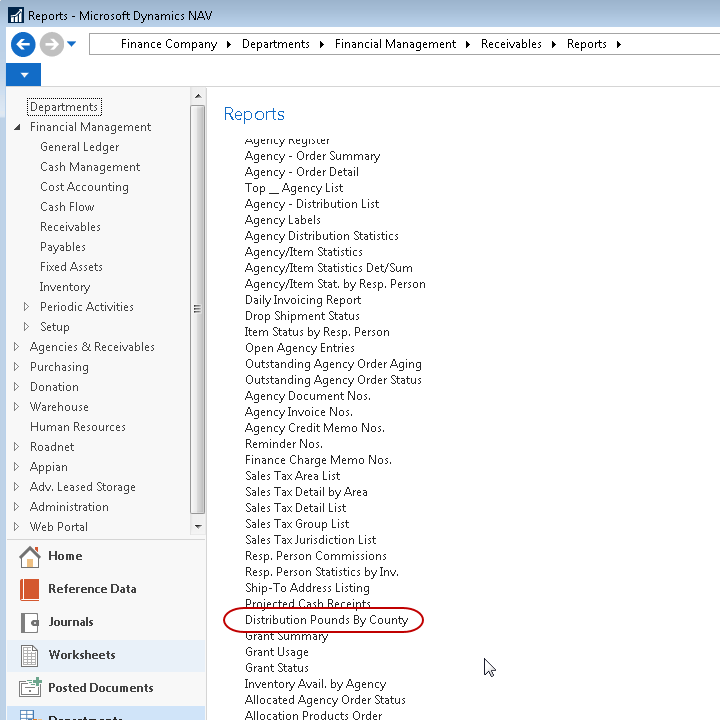
Click Departments ▸ Financial Management ▸ Receivables ▸Reports ▸ Distribution Pounds by County.
-
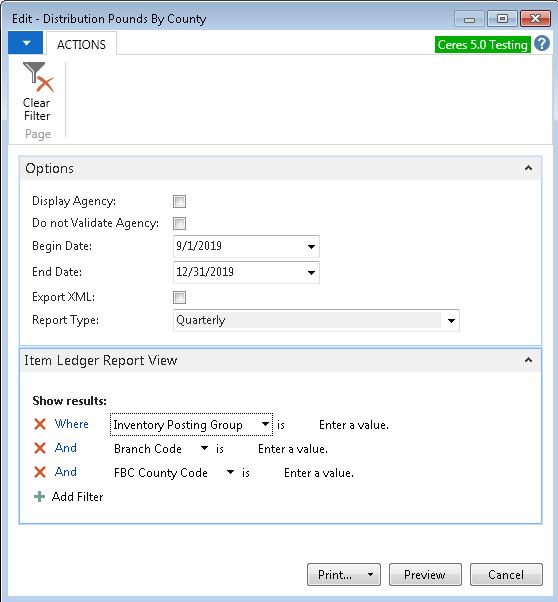
This will open the request page.
-
The Distribution Pounds by County report options are:
Display Agency: Prints the Agency Name on the printed report. This field does not affect the XML Export.
Do not Validate Agency:
Export XML: Exports an XML file for upload to HungerNet.
If the Export XML option is not selected:
-
The report can be run for any Begin Date and End Date.
-
The XML file will not be created.
If the Export XML option is selected:
-
The report can only be run for a Begin Date and End Date that spans a complete Month or Quarter depending upon which Report Type has been selected.
-
The Report Type “Monthly” or “Quarterly” must be selected and match the period covered by the Begin Date and End Date.
-
-
The XML file will be created in the location specified in the Temp Path field for the user running the report. This path is normally set to
C:\NAVTEMP\\. Once saved, it is recommended to move the report to a location on your network so that more than just the person running the export can access the file.
-
The XML file will be named as follows:


-
Amounts on both the Report and XML Export are rounded to the nearest whole number.

-
If a County is included on the Report and/or XML Export and does not have a UNC Count FIPS Code associated with it, the user will receive the following message upon running the report and/or export.

To resolve this error, review the FBC County Codes list to ensure that every county listed has a UNC County FIPS Code specified.
-
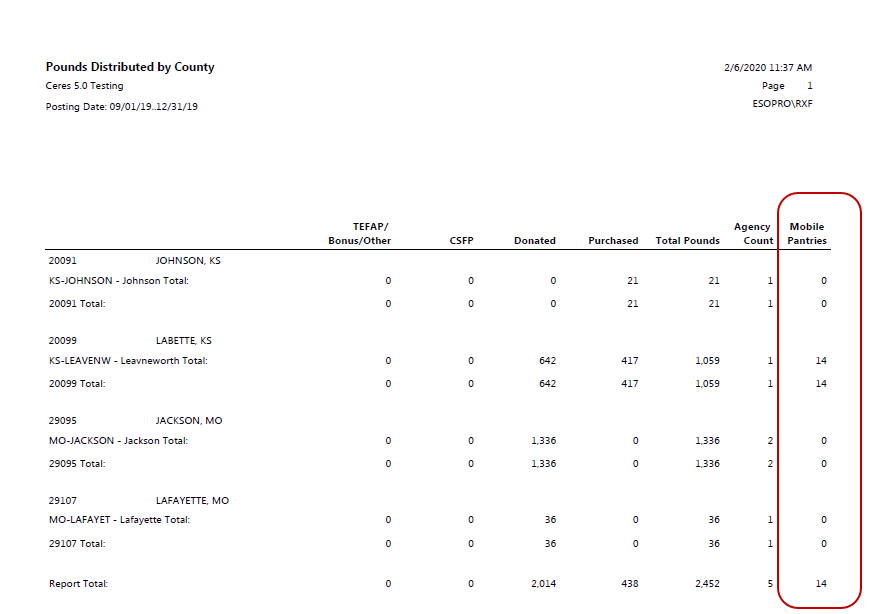
The number of Mobile Pantry Drops appears on the printed report to the right of the Agency Count field.