Comments Overview
Multiple comments can be added to Agencies, Donors, Vendors, Contacts, and Items within Ceres 5. Comments can also be dated, categorized and connected to a particular user.
Ceres Object release 5.00.00 is required for the functionality described in this document.
Overview
Comments functionality in Ceres includes:
- Standard Comment Categories – to standardize record keeping for reporting/searching
- Comment Codes – A user-defined field that can be used to define, track, and group like Comments
- User ID and Date –to track the user who created the comment and the date the comment was created. Both of these fields are automatically updated when a user creates a comment.
This comments functionality applies to Agencies, Donors, Vendors, Contacts, and Items in Ceres 5.
Workflow
The first step is to set up standard Comment Categories that can be linked to comments. This way when users view comments, they will be sorted by Comment Categories.
Comment Categories are defined by type: Agency, Donor/Vendor, Contact, or Item. This allows for transaction or process-specific Codes to be defined.
Once the Comment Categories are defined, they can be linked to new or existing comments.
Setting up Comment Categories
-
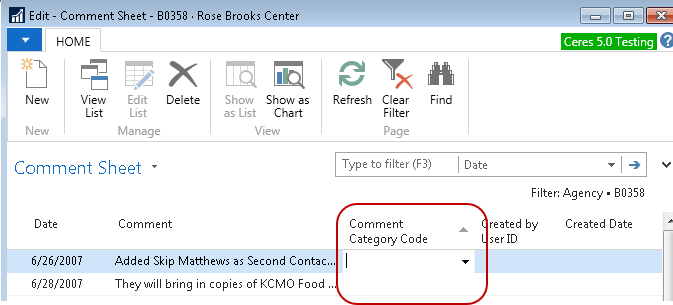
The Comment Categories can be accessed from the Agency, Donor, Vendor, Contact, or Item Card by selecting Navigate ▸ Comments. From the Comments List, drill down on the Comment Category Code field.
-
To create a new Comment Category, select New.

-
Choose the Type of Comment Category. The options are Agency, Donor/Vendor, Contact, or Item.
-
Enter a Code for the Comment Category.
-
Enter a Description.
-
Click OK.
Viewing and Editing Comments
-
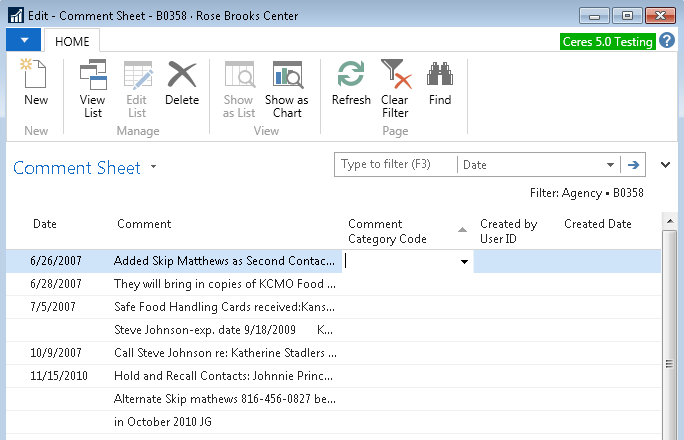
Comments can be viewed from an Agency, Donor, Vendor, Contact, or Item Card by selecting Navigate ▸ Comments.
-
New comments can be added by clicking on Home ▸ New.
-
In the Date field enter a date for the comment.
-
Type the comment in the Comment field. Comments can be up to 250 characters long. Longer comments can be entered on multiple lines.
-
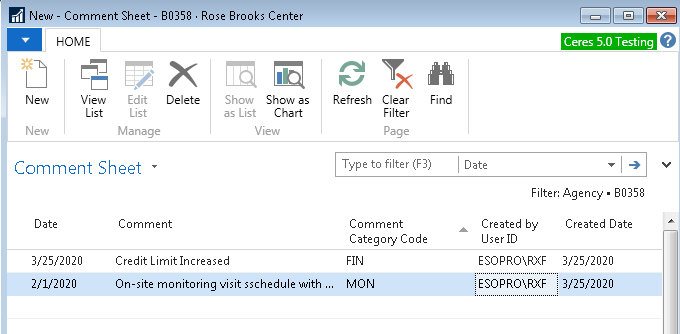
Select a Comment Category Code. The Comment Categories List is filtered by the Type, so only Comment Categories of Type = Agency will display from an Agency Card, and Type = Item from an Item Card, etc. The comments are sorted by Comment Category, and then (typically hidden) Line No. This way all like types of comments are together. If multiple comment lines are necessary, make sure you select a Comment Category Code on each comment line, or the comments will not sort correctly.
-
The Created by User ID and Created Date fields are updated automatically by Ceres when a new comment has been entered.
-
An existing Comment can be edited by clicking on the line and then updating the various fields.