Agency Express Orders Lost Product Checklist
The purpose of this document is to define what lost product means for Agency Express (AE) Orders, and discuss approaches for minimizing these situations with updates to Ceres and/or process changes. This document was updated as of June 2022.
What is Lost Product?
There is both a simple and a complex answer to the question – what is lost product? In its simple form, lost product is the situation that results when an Agency requests a certain Item and Quantity on Agency Express (AE) and the food bank is unable to fulfill the order as placed.
In its more complex form, losing product can occur at several steps in the ordering and fulfillment cycle, and sometimes the “loss” is actually an accurate representation of reduction of available food. Other times, the “loss” is due to a system issue, and action should be taken by the food bank to minimize this type of occurrence.
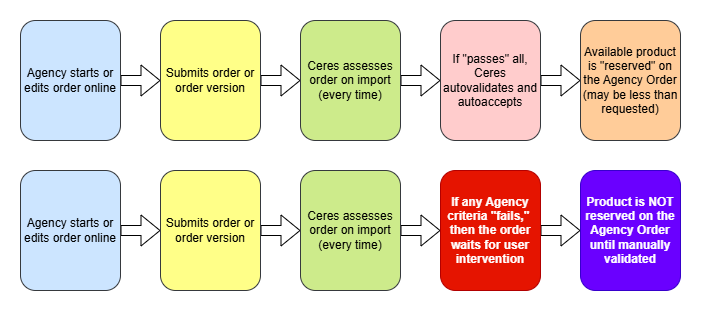
The table below outlines the general steps in the ordering/ fulfillment process and each step where a product loss could occur. There can be legitimate reasons why you might want to fulfill less quantity than the agency requested, and there are reasons that cause unintended product loss and those reasons can be mitigated by changing the setup in Ceres and/ or Agency Express.
| Step | Example reason for Loss | System or process change? |
|---|---|---|
| Agency does not see enough available inventory online | Max quantity in Ceres set too low. | System Setup – update Agency Groups/ Max Qty |
| Agency Selects a Shipment date and submits their Order | The Shipment Date is AFTER all currently available Lots of a perishable product, so the inventory is removed from the order | Establish a process to make sure the Lot Consume by Dates are accurate; establish a process to substitute a new perishable item if needed. |
| Agency edits their Order and inventory that was on the order now confirms back at a reduced amount | Process | |
| Agency moves their Shipment date out, and perishable inventory will not hold as long | See above | |
| The Agency status has changed during the ordering window, and now the order does not auto validate/ auto accept. (past due invoice, account on hold, over credit limit etc.) | Process: Review the Web Order exception list at least daily and manually validate the Orders and decide disposition. | |
| Product that was available is now on an Item Journal with a line type of Negative Adjustment. (Shorts/ Cuts; Cycle counts) | Process: if you use the Shorts/ Cuts journal then assess and clear it every work day. Set up your cycle count process so the journal does not generate as 100% negative adjustment. | |
| Food Bank edits order right before pick and shorts an item | Agency Ordered too much, product not holding as planned etc. Product sent on a Mobile instead. | Process: establish a substitute process to assist the agency with this intentional short. |
| Short or Cut at Pick | Order selector can’t find product in warehouse during picking and shorts/ cuts the quantity on the Pick. | System Setup and Process: The food bank can set up the Shorts/ Cuts journal to flow pick quantity reductions to a negative adjustment so they don’t immediately go back to AE. Validating the Shorts/ Cuts Journal and Cycle counting the Pick face each day can help with pick bin accuracy ongoing. Keeping up with Perishable assessment and disposal proactively can also help. |
| Agency Express Job Queue | Job Queue is interrupted and is not restarted in a timely manner. When this occurs the communication between Ceres and Agency Express is stopped. | System and Process: establish a process to check the Job Queue Entries and Error Log on a regular basis, most especially whenever a server patch is installed on your SQL server. Weekly server security patches are a frequent culprit. |
When might you experience “Lost Product”?

Order Steps
What you can do to mitigate product loss?
Ceres & Agency Express Data Set up
On Agency Express 3, Agencies see what is available NOW when they see the shopping list
When an Agency starts their Order on Agency Express, they are logged in with their current status and seeing the inventory you are showing right now. Both the Agency and the Item status changes all the time, so the status at day 1 for both the Agency and the Items may be very different than the status on day 8 of the order window.
The available Item quantity is the component that changes many times a day, so that is where we will start our mitigation discussion. Then we will look at the Agency status as well.
Agency Groups, Group & Lot Max Quantities
Agency Groups are used to centralize the maintenance of the Agency/Item qualifiers and maximum quantity limitations for Agencies. Agency Groups also serve to make the communication between Ceres and Agency Express more efficient. If you use Agency Express, Agency Groups are required. When used, Maximum Quantities limit the maximum quantity of items that share the Item Group Code listed (blank or otherwise). A blank Item Group Code can be used to easily apply a maximum quantity to all items. When the Max. Qty. Type is Amount; the available amount is limited to the amount shown in the value column. When the Max. Qty. Type is Lot Multiplier; the standard Lot Maximums are used, and the results are multiplied by the quantity in the value column. For more information, see Agency Groups and Max Quantities.
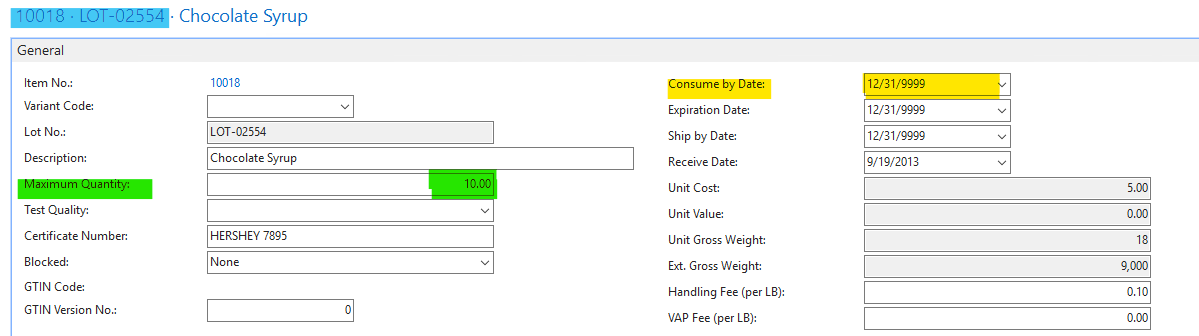
Lot Max value - the Lot Max value can be set on the Lot card during the receipt of the inventory, If the Maximum Qty. field is not populated during receipt and the food bank wishes to restrict distribution by Lot Multipliers, then the user must go to the Lot Card and edit the Maximum Quantity field on the Lot General FastTab. Lot Max values can be scaled in the Agency Group Code set up. If the Max Qty. Type for the item is Lot Multiplier, then Ceres will take the Maximum Quantity on the Lot multiplied by the Quantity in the Value column to determine how much of that product an Agency in this Agency Group can see and order.
If the on the Item card, the Item Group Code is populated, this Item Group Code will override the Lot Max value and will be the limit that the Agency sees as available.
Lot Consume by Date on Perishables
New Lots are established every day, and existing product hold times may vary a great deal based on season, shipping temperature, product type etc. Ceres manages this with dates on the LOT table (as shown in the previous graphic).
The Lot Consume By Date is of particular importance in Lost Product scenarios- once the Lot Consume By Date passes, all the Quantity remaining for that Lot is only “On Hand”, but no longer available for Agency distribution. The assumption is that the food is no longer of acceptable quality for consumption. Please note that the Consume By Date is the date with “teeth.” The Expiration Date and the Ship By Date are warning dates for the food bank team. When Ceres validates an Agency Order, the Shipment Date of the Order is compared with the Consume By Date of the current Lots to determine available inventory. If the Agency Order Shipment Date (Appointment Date) is after the Consume By Date of the lot, the quantity of that given Lot is subtracted from available quantity for that Agency. If the Agency moves their Shipment date forward, this can cause lost product if all Lots are assumed to be spoiled before the new Shipment date.
Shorts & Cuts Journal
Having to short or cut product from an Agency Order Pick is a fairly common occurrence. This means that the order selector was unable to find all the product that the Agency requested. One of the challenges in some Ceres versions is that the Items shorted or cut from a Pick actually flush back to Available Quantity, just to be ordered right away by an Agency on Agency Express. So the cycle continues – the three cases you could not find yesterday are still missing today and get shorted from yet another pick. Frustrating for all. The Inventory Short & Cut Handling functionality provides different methods for handling inventory shortages that a food bank can select on a location by location basis. Shortages are when the quantity shipped is less than the original order quantity on an Agency Order, Inventory Pick, or Warehouse Shipment. This allows for different short handling processes at each location. For more information, see the Inventory Shorts Handling procedure.
If product that you actually have in stock is on the Shorts/ Cuts journal as a negative adjustment line, then that food is being held as not available for orders. If you use this helpful functionality, it is strongly recommended that you establish a daily validation and adjustment handling process.
Item/ Lots – Cycle Counts
A Daily Cycle count process enables Food Banks to increase the accuracy of their inventory and the accuracy of the inventory that is made available for Agencies to order. The increased accuracy mitigates the opportunity for lost product.
There is a risk here as well – depending on your Ceres set up, the Physical Inventory Cycle Count Journal may be generated as all negative adjustments. This is a common set up if you use Warehouse scanners. When the journal is generated as 100% negative adjustments, then ALL the inventory in the journal is removed from available quantity in Ceres until the line is updated with the counted quantity, this process can affect orders edited during the cycle counts and orders started during that time window. There are a few approaches to mitigate these risks, and your Ceres support provider can assist you in selecting the best option for you.
Changes to Agency Status and UNC Activity Status
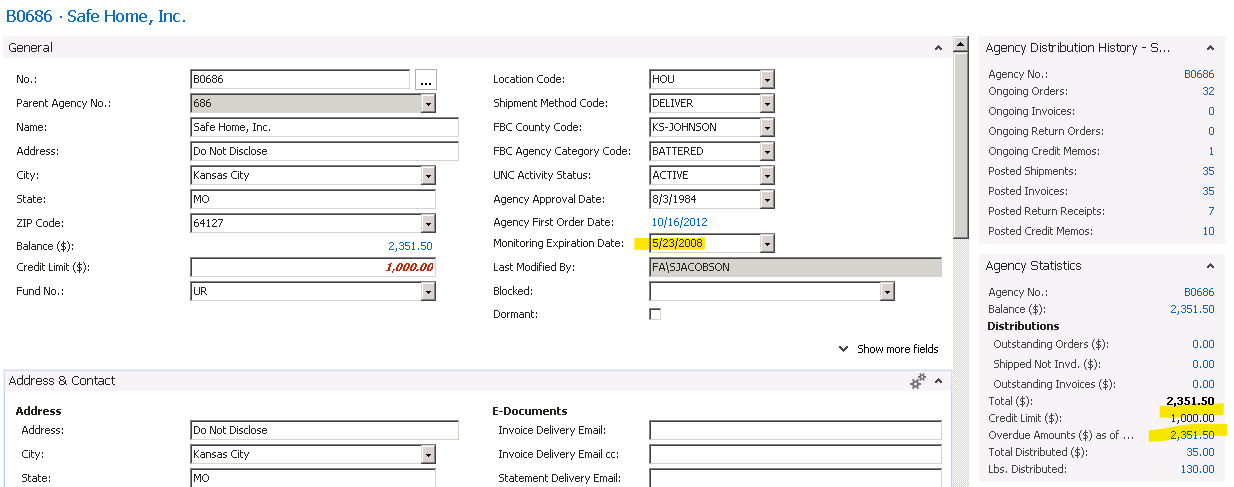
The Agency status can change during the ordering window as well, which can cause a new Order or a previously “fine” order to fail the auto validate/ auto accept steps. Some common reasons for this failure include:
-
The food bank has placed the Agency on hold with a UNC Activity Status
-
An Agency invoice has agenda and become past due
-
And Agency is now over their credit limit
Process & Communication Changes
As mentioned above, even if the food bank incorporates all the setup changes that are applicable for a given situation, “lost” product may still occur. The last recommendation is to incorporate some specific Agency Express order processes and communication changes into the daily workflow.
Communicate the known risks
Let Agencies know that an Agency Express order is an order request, not an order guarantee. Food bank inventory management is tricky work, and the product mix and aging changes every day.
Check the Web Exception List
If an Agency Order fails to auto validate/ auto accept, then it will show in the Agency Order list with no Agency Address and no line quantities. It will also show on the Web Exception List page for the user to validate and either accept or reject the order. If you are having problems with lost product, watch for these orders and handle them at least daily.
Monitor the Agency Express Job Queue
Monitoring the Agency Express Job Queue will insure that the orders and Item availability communication is flowing between Ceres and Agency Express.
Starting in Ceres 4.5 - there is functionality to proactively email when the communication is impacted by some scenarios. Your Ceres support provider can help you set this functionality up. Sadly, since this process monitor is run by the Job Queue, if the Job queue is the component that goes down, you will not get a notice. The Agency Express Job Queue can be interrupted by anything that causes the Ceres SQL server to be restarted. Lately, security updates and server patches have become more critical, so it is important to add a process to make sure that the Agency Express Job queue is in a Ready status after any system maintenance.
Additional Resources
User Groups and Webinars
You must be logged into Hungernet for the links below to function.
-
Agency Express Lost Product User Group presentation slides and recording
-
Where is my Agency Express Order User Group slides and recording
-
Cycle Counts and impacts of ADCS User group presentation and slides
-
Available Quantity deep dive User Group presentation and slides
-
Options for tracking Agency Monitoring Data User Group presentation and slides